
主题
ButtonStyle
用于控制按钮的所有视觉方面,例如形状、前景色、背景色、阴影颜色、内容内边距、边框宽度和圆角。
这些样式属性大多可以针对按钮的全部或特定 ControlState 进行配置, 例如 HOVERED、FOCUSED、DISABLED 等。
属性
| 名称 | 类型 | 默认值 | 说明 |
|---|---|---|---|
color | Optional[ControlStateValue[ColorValue]] | None | The color for the button's Text and Icon control descendants. |
bgcolor | Optional[ControlStateValue[ColorValue]] | None | The button's background fill color. |
overlay_color | Optional[ControlStateValue[ColorValue]] | None | The highlight color that's typically used to indicate that the button is focused, hovered, or pressed. |
shadow_color | Optional[ControlStateValue[ColorValue]] | None | The shadow color of the button's Material. |
elevation | Optional[ControlStateValue[Optional[Number]]] | None | The elevation of the button's Material. |
animation_duration | Optional[DurationValue] | None | Defines the duration in milliseconds of animated changes for shape and elevation. |
padding | Optional[ControlStateValue[PaddingValue]] | None | The padding between the button's boundary and its content. |
side | Optional[ControlStateValue[BorderSide]] | None | Defines the button's border outline. |
shape | Optional[ControlStateValue[OutlinedBorder]] | None | The shape of the button's underlying Material. |
alignment | Optional[Alignment] | None | The alignment of the button's content. |
enable_feedback | Optional[bool] | None | Whether detected gestures should provide acoustic and/or haptic feedback. |
text_style | Optional[ControlStateValue[TextStyle]] | None | The text style of the button's Text control descendants. |
icon_size | Optional[ControlStateValue[Optional[Number]]] | None | The icon's size inside of the button. |
icon_color | Optional[ControlStateValue[ColorValue]] | None | The icon's color inside the button. If not set or None, then the color will be used. |
visual_density | Optional[VisualDensity] | None | Defines how compact the button's layout will be. |
mouse_cursor | Optional[ControlStateValue[MouseCursor]] | None | The cursor to be displayed when the mouse pointer enters or is hovering over the button. |
方法
| 名称 | 类型 | 默认值 | 说明 |
|---|---|---|---|
copy | 'ButtonStyle' | — | 返回此对象的副本,可覆盖指定属性。 |
使用示例
你可以为悬停状态配置不同的形状、背景色,并为所有其他状态配置回退值。
要为所有 Material 状态配置某个样式属性,将其值设为一个字面值(或类实例)即可。例如,如果把 color 属性设为字面值,该值会应用到按钮的所有状态:
python
ButtonStyle(
    color=ft.Colors.WHITE
)
要为特定的 Material 状态配置某个样式属性,将其值设为一个字典,其中键为状态名。例如,要为 HOVERED 和 FOCUSED 状态配置不同的背景色,同时为所有其他状态配置另外的颜色:
python
ButtonStyle(
    color={
        ft.ControlState.HOVERED: ft.Colors.WHITE,
        ft.ControlState.FOCUSED: ft.Colors.BLUE,
        ft.ControlState.DEFAULT: ft.Colors.BLACK,
    }
)
各种按钮形状示例
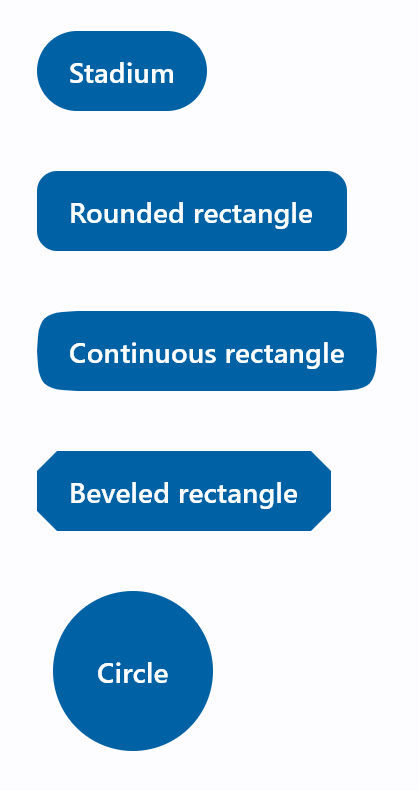
python
import flet as ft

def main(page: ft.Page):
    page.padding = 30
    page.spacing = 30
    page.add(
        ft.FilledButton(
            "Stadium",
            style=ft.ButtonStyle(
                shape=ft.StadiumBorder(),
            ),
        ),
        ft.FilledButton(
            "Rounded rectangle",
            style=ft.ButtonStyle(
                shape=ft.RoundedRectangleBorder(radius=10),
            ),
        ),
        ft.FilledButton(
            "Continuous rectangle",
            style=ft.ButtonStyle(
                shape=ft.ContinuousRectangleBorder(radius=30),
            ),
        ),
        ft.FilledButton(
            "Beveled rectangle",
            style=ft.ButtonStyle(
                shape=ft.BeveledRectangleBorder(radius=10),
            ),
        ),
        ft.FilledButton(
            "Circle",
            style=ft.ButtonStyle(shape=ft.CircleBorder(), padding=30),
        ),
    )

ft.run(main)
样式化按钮示例
请查看以下示例:
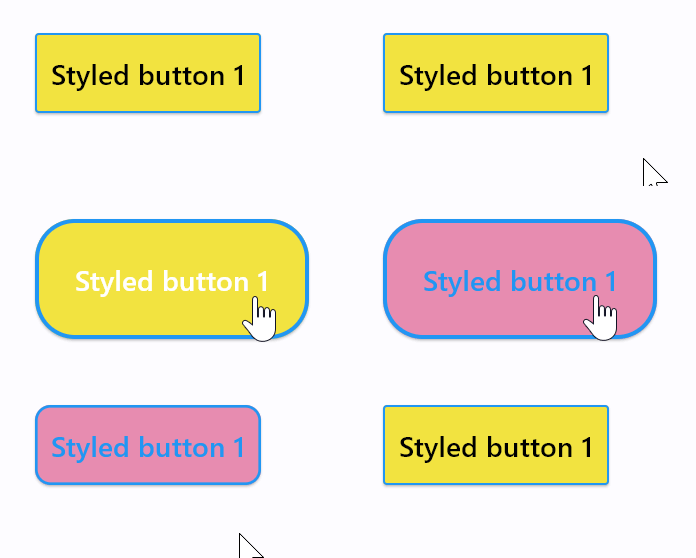
python
import flet as ft

def main(page: ft.Page):

    page.add(
        ft.Button(
            "Styled button 1",
            style=ft.ButtonStyle(
                color={
                    ft.ControlState.HOVERED: ft.Colors.WHITE,
                    ft.ControlState.FOCUSED: ft.Colors.BLUE,
                    ft.ControlState.DEFAULT: ft.Colors.BLACK,
                },
                bgcolor={ft.ControlState.FOCUSED: ft.Colors.PINK_200, "": ft.Colors.YELLOW},
                padding={ft.ControlState.HOVERED: 20},
                overlay_color=ft.Colors.TRANSPARENT,
                elevation={"pressed": 0, "": 1},
                animation_duration=500,
                side={
                    ft.ControlState.DEFAULT: ft.BorderSide(1, ft.Colors.BLUE),
                    ft.ControlState.HOVERED: ft.BorderSide(2, ft.Colors.BLUE),
                },
                shape={
                    ft.ControlState.HOVERED: ft.RoundedRectangleBorder(radius=20),
                    ft.ControlState.DEFAULT: ft.RoundedRectangleBorder(radius=2),
                },
            ),
        )
    )

ft.run(main)