
主题
Canvas
Canvas 继承自:LayoutControl, Control, BaseControl
Canvas 是一个用于绘制任意图形的控件,它使用一组图元(或称“形状”),例如直线、弧线、路径和文本。
示例:
python
cv.Canvas(
    width=160,
    height=160,
    shapes=[
        cv.Rect(
            0,
            0,
            160,
            160,
            paint=ft.Paint(
                color=ft.Colors.BLUE_100,
                style=ft.PaintingStyle.FILL,
            ),
        ),
        cv.Circle(
            80,
            80,
            50,
            paint=ft.Paint(
                color=ft.Colors.BLUE_400,
                style=ft.PaintingStyle.FILL,
            ),
        ),
    ],
)
示例
python
import math

import flet as ft
import flet.canvas as cv


def main(page: ft.Page):
    stroke_paint = ft.Paint(stroke_width=2, style=ft.PaintingStyle.STROKE)
    fill_paint = ft.Paint(style=ft.PaintingStyle.FILL)

    page.add(
        ft.SafeArea(
            content=cv.Canvas(
                width=float("inf"),
                expand=True,
                shapes=[
                    cv.Circle(x=100, y=100, radius=50, paint=stroke_paint),
                    cv.Circle(x=80, y=90, radius=10, paint=stroke_paint),
                    cv.Circle(x=84, y=87, radius=5, paint=fill_paint),
                    cv.Circle(x=120, y=90, radius=10, paint=stroke_paint),
                    cv.Circle(x=124, y=87, radius=5, paint=fill_paint),
                    cv.Arc(
                        x=70,
                        y=95,
                        width=60,
                        height=40,
                        start_angle=0,
                        sweep_angle=math.pi,
                        paint=stroke_paint,
                    ),
                ],
            )
        )
    )


if __name__ == "__main__":
    ft.run(main)
python
import flet as ft
import flet.canvas as cv


def main(page: ft.Page):
    page.theme_mode = ft.ThemeMode.LIGHT

    page.add(
        ft.SafeArea(
            content=cv.Canvas(
                width=float("inf"),
                expand=True,
                shapes=[
                    cv.Path(
                        elements=[
                            cv.Path.MoveTo(x=25, y=125),
                            cv.Path.QuadraticTo(cp1x=50, cp1y=25, x=135, y=35, w=0.35),
                            cv.Path.QuadraticTo(cp1x=75, cp1y=115, x=135, y=215, w=0.6),
                            cv.Path.QuadraticTo(cp1x=50, cp1y=225, x=25, y=125, w=0.35),
                        ],
                        paint=ft.Paint(
                            stroke_width=2,
                            style=ft.PaintingStyle.FILL,
                            color=ft.Colors.PINK_400,
                        ),
                    ),
                    cv.Path(
                        elements=[
                            cv.Path.MoveTo(x=85, y=125),
                            cv.Path.QuadraticTo(cp1x=120, cp1y=85, x=165, y=75, w=0.5),
                            cv.Path.QuadraticTo(
                                cp1x=120, cp1y=115, x=165, y=175, w=0.3
                            ),
                            cv.Path.QuadraticTo(cp1x=120, cp1y=165, x=85, y=125, w=0.5),
                        ],
                        paint=ft.Paint(
                            stroke_width=2,
                            style=ft.PaintingStyle.FILL,
                            color=ft.Colors.with_opacity(0.5, ft.Colors.BLUE_400),
                        ),
                    ),
                ],
            )
        )
    )


if __name__ == "__main__":
    ft.run(main)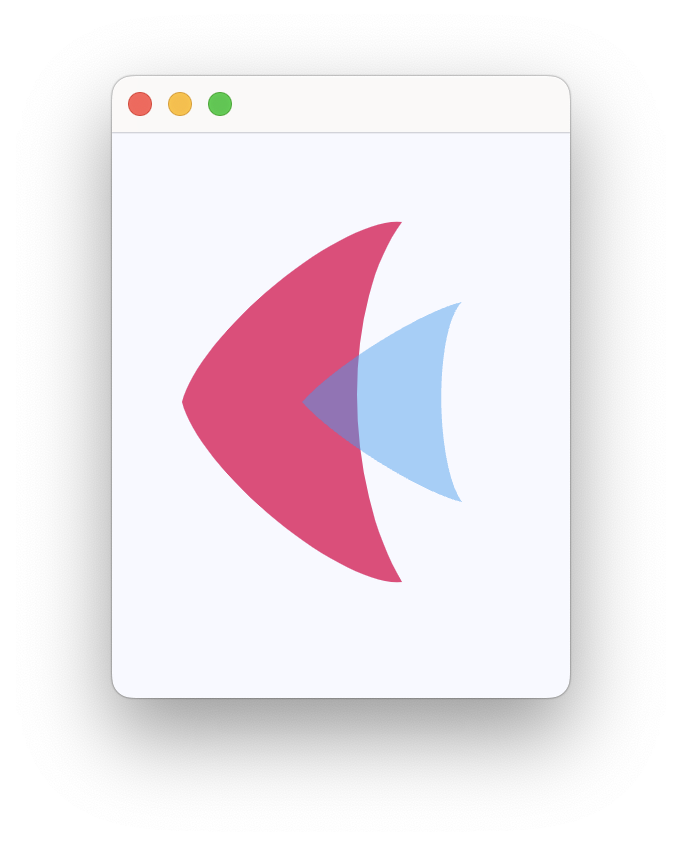
python
import flet as ft
import flet.canvas as cv


def main(page: ft.Page):
    page.add(
        ft.SafeArea(
            content=cv.Canvas(
                width=float("inf"),
                expand=True,
                shapes=[
                    cv.Path(
                        paint=ft.Paint(style=ft.PaintingStyle.FILL),
                        elements=[
                            cv.Path.MoveTo(x=25, y=25),
                            cv.Path.LineTo(x=105, y=25),
                            cv.Path.LineTo(x=25, y=105),
                        ],
                    ),
                    cv.Path(
                        paint=ft.Paint(stroke_width=2, style=ft.PaintingStyle.STROKE),
                        elements=[
                            cv.Path.MoveTo(x=125, y=125),
                            cv.Path.LineTo(x=125, y=45),
                            cv.Path.LineTo(x=45, y=125),
                            cv.Path.Close(),
                        ],
                    ),
                ],
            )
        )
    )


if __name__ == "__main__":
    ft.run(main)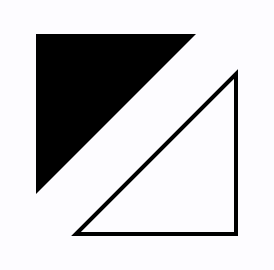
python
import flet as ft
import flet.canvas as cv


def main(page: ft.Page):
    cp = cv.Canvas(
        width=float("inf"),
        expand=True,
        shapes=[
            cv.Path(
                paint=ft.Paint(stroke_width=2, style=ft.PaintingStyle.STROKE),
                elements=[
                    cv.Path.MoveTo(x=75, y=25),
                    cv.Path.QuadraticTo(cp1x=25, cp1y=25, x=25, y=62.5),
                    cv.Path.QuadraticTo(cp1x=25, cp1y=100, x=50, y=100),
                    cv.Path.QuadraticTo(cp1x=50, cp1y=120, x=30, y=125),
                    cv.Path.QuadraticTo(cp1x=60, cp1y=120, x=65, y=100),
                    cv.Path.QuadraticTo(cp1x=125, cp1y=100, x=125, y=62.5),
                    cv.Path.QuadraticTo(cp1x=125, cp1y=25, x=75, y=25),
                ],
            ),
            cv.Path(
                elements=[
                    cv.Path.SubPath(
                        x=100,
                        y=100,
                        elements=[
                            cv.Path.MoveTo(x=75, y=40),
                            cv.Path.CubicTo(
                                cp1x=75, cp1y=37, cp2x=70, cp2y=25, x=50, y=25
                            ),
                            cv.Path.CubicTo(
                                cp1x=20, cp1y=25, cp2x=20, cp2y=62.5, x=20, y=62.5
                            ),
                            cv.Path.CubicTo(
                                cp1x=20, cp1y=80, cp2x=40, cp2y=102, x=75, y=120
                            ),
                            cv.Path.CubicTo(
                                cp1x=110, cp1y=102, cp2x=130, cp2y=80, x=130, y=62.5
                            ),
                            cv.Path.CubicTo(
                                cp1x=130, cp1y=62.5, cp2x=130, cp2y=25, x=100, y=25
                            ),
                            cv.Path.CubicTo(
                                cp1x=85, cp1y=25, cp2x=75, cp2y=37, x=75, y=40
                            ),
                        ],
                    )
                ],
                paint=ft.Paint(
                    style=ft.PaintingStyle.FILL,
                    gradient=ft.PaintRadialGradient(
                        center=ft.Offset(150, 150),
                        radius=50,
                        colors=[ft.Colors.PINK_100, ft.Colors.PINK],
                    ),
                ),
            ),
        ],
    )

    page.add(ft.SafeArea(content=cp))


if __name__ == "__main__":
    ft.run(main)
python
import math

import flet as ft
import flet.canvas as cv


def main(page: ft.Page):
    page.add(
        ft.SafeArea(
            content=cv.Canvas(
                width=float("inf"),
                expand=True,
                shapes=[
                    cv.Text(x=0, y=0, value="Just a text"),
                    cv.Circle(
                        x=200, y=100, radius=2, paint=ft.Paint(color=ft.Colors.RED)
                    ),
                    cv.Text(
                        x=200,
                        y=100,
                        style=ft.TextStyle(weight=ft.FontWeight.BOLD, size=30),
                        alignment=ft.Alignment.TOP_CENTER,
                        rotate=math.pi * 0.15,
                        value="Rotated",
                        spans=[
                            ft.TextSpan(
                                text="around top_center",
                                style=ft.TextStyle(
                                    italic=True, color=ft.Colors.GREEN, size=20
                                ),
                            )
                        ],
                    ),
                    cv.Circle(
                        x=400, y=100, radius=2, paint=ft.Paint(color=ft.Colors.RED)
                    ),
                    cv.Text(
                        x=400,
                        y=100,
                        value="Rotated around top_left",
                        style=ft.TextStyle(size=20),
                        alignment=ft.Alignment.TOP_LEFT,
                        rotate=math.pi * -0.15,
                    ),
                    cv.Circle(
                        x=600, y=200, radius=2, paint=ft.Paint(color=ft.Colors.RED)
                    ),
                    cv.Text(
                        x=600,
                        y=200,
                        value="Rotated around center",
                        style=ft.TextStyle(size=20),
                        alignment=ft.Alignment.CENTER,
                        rotate=math.pi / 2,
                    ),
                    cv.Text(
                        x=300,
                        y=400,
                        value=(
                            "Limited to max_width and right-aligned.\n"
                            "Lorem ipsum dolor sit amet, consectetur adipiscing elit, "
                            "sed do eiusmod tempor incididunt ut labore et dolore "
                            "magna aliqua. Ut enim ad minim veniam, quis nostrud "
                            "exercitation "
                            "ullamco laboris nisi ut aliquip ex ea commodo consequat."
                        ),
                        text_align=ft.TextAlign.RIGHT,
                        max_width=400,
                    ),
                    cv.Text(
                        x=200,
                        y=200,
                        value="WOW!",
                        style=ft.TextStyle(
                            weight=ft.FontWeight.BOLD,
                            size=100,
                            foreground=ft.Paint(
                                color=ft.Colors.PINK,
                                stroke_width=6,
                                style=ft.PaintingStyle.STROKE,
                                stroke_join=ft.StrokeJoin.ROUND,
                                stroke_cap=ft.StrokeCap.ROUND,
                            ),
                        ),
                    ),
                    cv.Text(
                        x=200,
                        y=200,
                        value="WOW!",
                        style=ft.TextStyle(
                            weight=ft.FontWeight.BOLD,
                            size=100,
                            foreground=ft.Paint(
                                gradient=ft.PaintLinearGradient(
                                    begin=(200, 200),
                                    end=(300, 300),
                                    colors=[ft.Colors.YELLOW, ft.Colors.RED],
                                ),
                                stroke_join=ft.StrokeJoin.ROUND,
                                stroke_cap=ft.StrokeCap.ROUND,
                            ),
                        ),
                    ),
                ],
            )
        )
    )


if __name__ == "__main__":
    ft.run(main)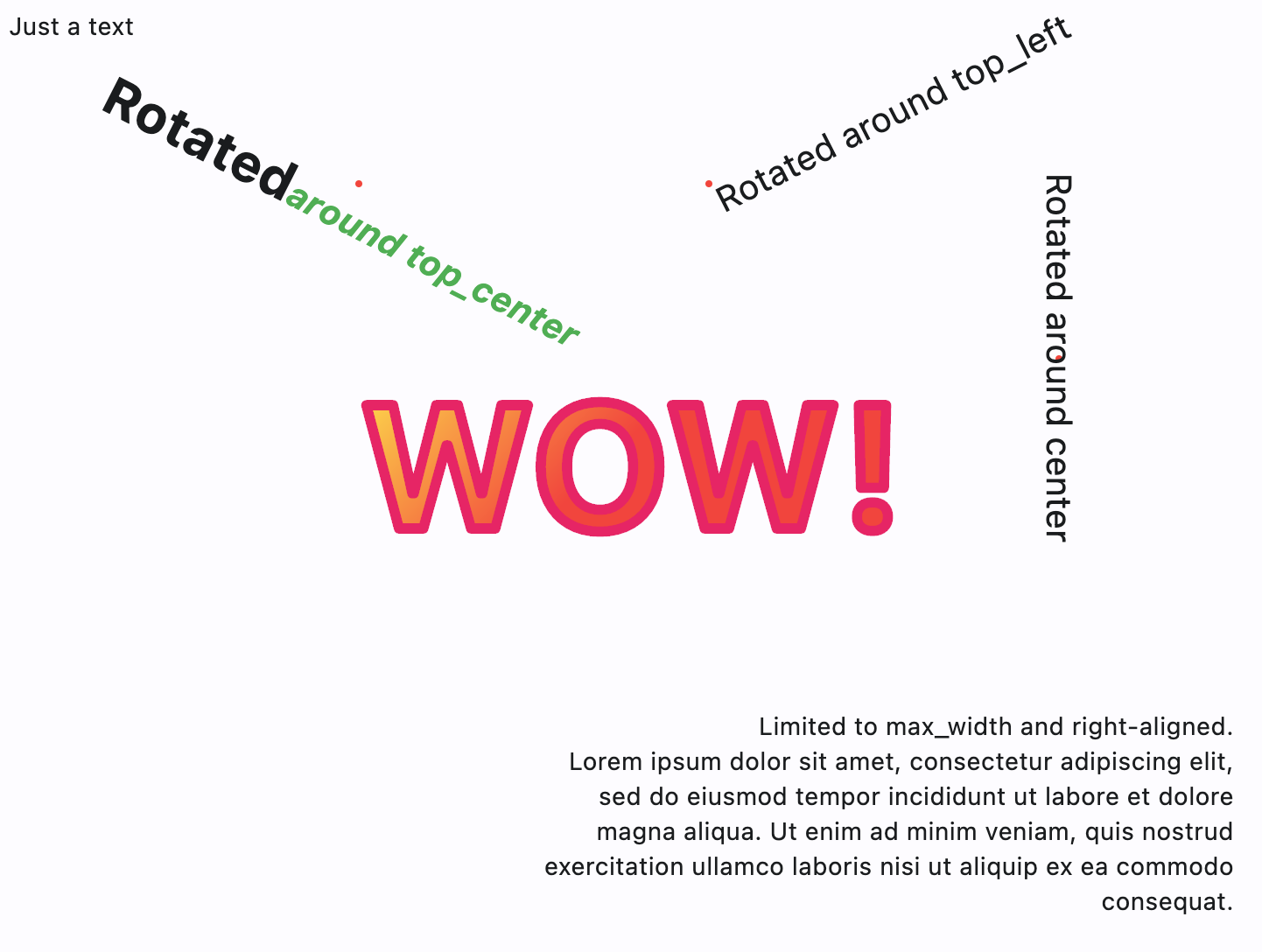
python
from dataclasses import dataclass

import flet as ft
import flet.canvas as cv

MAX_SHAPES_PER_CAPTURE = 30


@dataclass
class State:
    x: float = 0
    y: float = 0
    shapes_count: int = 1


state = State()


def main(page: ft.Page):
    page.title = "Canvas Example"

    file_picker = ft.FilePicker()

    def handle_pan_start(e: ft.DragStartEvent):
        state.x = e.local_position.x
        state.y = e.local_position.y

    async def handle_pan_update(e: ft.DragUpdateEvent):
        # ft.context.disable_auto_update()
        canvas.shapes.append(
            cv.Line(
                x1=state.x,
                y1=state.y,
                x2=e.local_position.x,
                y2=e.local_position.y,
                paint=ft.Paint(stroke_width=3),
            )
        )
        canvas.update()
        state.shapes_count += 1

        if state.shapes_count == MAX_SHAPES_PER_CAPTURE:
            await canvas.capture()
            canvas.shapes.clear()
            canvas.update()
            state.shapes_count = 0

        state.x = e.local_position.x
        state.y = e.local_position.y

    canvas = cv.Canvas(
        expand=False,
        shapes=[
            cv.Fill(ft.Paint(color=ft.Colors.WHITE)),
        ],
        content=ft.GestureDetector(
            on_pan_start=handle_pan_start,
            on_pan_update=handle_pan_update,
            drag_interval=10,
        ),
    )

    async def save_image():
        await canvas.capture()
        capture = await canvas.get_capture()
        if capture:
            file_path = await file_picker.save_file(
                file_name="flet_picture.png", src_bytes=capture
            )
            if file_path and page.platform in [
                ft.PagePlatform.MACOS,
                ft.PagePlatform.WINDOWS,
                ft.PagePlatform.LINUX,
            ]:
                with open(file_path, "wb") as f:
                    f.write(capture)

    page.add(
        ft.SafeArea(
            expand=True,
            content=ft.Column(
                controls=[
                    ft.Button("Save image", on_click=save_image),
                    ft.Container(
                        border_radius=5,
                        border=ft.Border.all(2),
                        bgcolor=ft.Colors.WHITE,
                        width=float("inf"),
                        expand=True,
                        content=canvas,
                    ),
                ]
            ),
        ),
    )


if __name__ == "__main__":
    ft.run(main)
python
import math

import flet as ft
import flet.canvas as cv


def main(page: ft.Page):
    page.add(
        ft.SafeArea(
            content=cv.Canvas(
                width=float("inf"),
                expand=True,
                shapes=[
                    cv.Rect(
                        x=10,
                        y=10,
                        width=100,
                        height=100,
                        border_radius=5,
                        paint=ft.Paint(
                            style=ft.PaintingStyle.FILL,
                            gradient=ft.PaintLinearGradient(
                                begin=(0, 10),
                                end=(100, 50),
                                colors=[ft.Colors.BLUE, ft.Colors.YELLOW],
                            ),
                        ),
                    ),
                    cv.Circle(
                        x=60,
                        y=170,
                        radius=50,
                        paint=ft.Paint(
                            style=ft.PaintingStyle.FILL,
                            gradient=ft.PaintRadialGradient(
                                radius=50,
                                center=(60, 170),
                                colors=[ft.Colors.YELLOW, ft.Colors.BLUE],
                            ),
                        ),
                    ),
                    cv.Path(
                        elements=[
                            cv.Path.Arc(
                                x=10,
                                y=230,
                                width=100,
                                height=100,
                                start_angle=3 * math.pi / 4,
                                sweep_angle=3 * math.pi / 2,
                            ),
                        ],
                        paint=ft.Paint(
                            stroke_width=15,
                            stroke_join=ft.StrokeJoin.ROUND,
                            style=ft.PaintingStyle.STROKE,
                            gradient=ft.PaintSweepGradient(
                                start_angle=0,
                                end_angle=math.pi * 2,
                                rotation=3 * math.pi / 4,
                                center=(60, 280),
                                colors=[ft.Colors.YELLOW, ft.Colors.PURPLE],
                                color_stops=[0.0, 1.0],
                            ),
                        ),
                    ),
                ],
            )
        )
    )


if __name__ == "__main__":
    ft.run(main)
属性
| 名称 | 类型 | 默认值 | 说明 |
|---|---|---|---|
shapes | list[Shape] | [] | 要在此画布上绘制的形状列表。 |
content | Optional[Control] | None | 此画布的内容。 |
resize_interval | Number | 10 | on_resize 事件的采样间隔(毫秒)。 设为 0 时,每次变化都会立即调用 on_resize。 |
width | Optional[Number] | None | 控件的强制宽度(以虚拟像素为单位)。 |
height | Optional[Number] | None | 控件的强制高度(以虚拟像素为单位)。 |
left | Optional[Number] | None | 子控件左边缘相对于 Stack 左侧的内缩距离。 注意: 仅当此控件是以下之一的后代时才生效: Stack 控件、overlay 列表。 |
top | Optional[Number] | None | 子控件上边缘相对于 Stack 顶部的内缩距离。 注意: 仅当此控件是以下之一的后代时才生效: Stack 控件、overlay 列表。 |
right | Optional[Number] | None | 子控件右边缘相对于 Stack 右侧的内缩距离。 注意: 仅当此控件是以下之一的后代时才生效: Stack 控件、overlay 列表。 |
bottom | Optional[Number] | None | 子控件下边缘相对于 Stack 底部的内缩距离。 注意: 仅当此控件是以下之一的后代时才生效: Stack 控件、overlay 列表。 |
align | Optional[Alignment] | None | 控件在其父级中的对齐方式。 |
margin | Optional[MarginValue] | None | 设置控件的外边距。 |
rotate | Optional[RotateValue] | None | 围绕控件中心旋转来变换此控件。 rotate 属性的值可以是以下类型之一: * number —— 顺时针旋转的弧度值。整圈 360° 为 math.pi * 2 弧度,90° 为 pi / 2,45° 为 pi / 4,以此类推。 * Rotate —— 允许同时指定旋转 angle 和 alignment,即旋转中心的位置。 示例: python ft.Image( src="https://picsum.photos/100/100", width=100, height=100, border_radius=5, rotate=Rotate(angle=0.25 * pi, alignment=ft.Alignment.CENTER_LEFT) ) |
scale | Optional[ScaleValue] | None | 沿二维平面缩放此控件。默认缩放因子为 1.0,表示不缩放。 例如,将此属性设为 0.5 会让控件缩小一半,而设为 2.0 则会放大一倍。 通过将 Control.scale 属性设为 Scale 类的实例,可以为 x 和 y 轴指定不同的缩放倍数。可以指定 scale,或者指定 scale_x 和 scale_y,但不能同时指定全部。 示例: python ft.Image( src="https://picsum.photos/100/100", width=100, height=100, border_radius=5, scale=ft.Scale(scale_x=2, scale_y=0.5) ) |
offset | Optional[OffsetValue] | None | 在绘制控件之前应用平移变换。 平移量表示为按控件尺寸缩放的 Offset。例如,Offset(x=0.25, y=0) 会使控件沿水平方向平移其宽度的四分之一。 示例 下面的示例把容器显示在 Stack 的 0, 0 左上角,因为变换对控件应用了 -1 * 100, -1 * 100(即 offset * control's size)的水平与垂直平移: python import flet as ft def main(page: ft.Page): page.add( ft.Stack( width=1000, height=1000, controls=[ ft.Container( bgcolor=ft.Colors.RED, width=100, height=100, left=100, top=100, offset=ft.Offset(-1, -1), ) ], ) ) ft.run(main) |
flip | Optional[Flip] | None | 水平方向和/或垂直方向翻转此控件。 设为 Flip 的实例即可沿 x 轴、y 轴或两者镜像翻转。 |
transform | Optional[Transform] | None | 对此控件应用通用矩阵变换。 设为带 Matrix4 记录的 Transform 实例,用以描述任意的变换序列。 |
aspect_ratio | Optional[Number] | None | 控件的宽高比,定义为 width 与 height 的比值。 注意: 在当前实现中,如果设置了 aspect_ratio,同一控件上的 width 和 height 将在最终渲染尺寸中被忽略。 |
animate_opacity | Optional[AnimationValue] | None | 启用 opacity 属性的隐式动画。 更多信息见此处。 |
animate_size | Optional[AnimationValue] | None | 启用此控件尺寸的隐式动画。 如果设置了 width 或 height,则这些维度的变化会以动画呈现。如果两者都未设置,则对控件自然尺寸的变化进行动画。 更多信息见此处。 |
animate_position | Optional[AnimationValue] | None | 启用定位属性(left、right、top 和 bottom)的隐式动画。 更多信息见此处。 |
animate_align | Optional[AnimationValue] | None | 启用 align 属性的隐式动画。 更多信息见此处。 |
animate_margin | Optional[AnimationValue] | None | 启用 margin 属性的隐式动画。 更多信息见此处。 |
animate_rotation | Optional[AnimationValue] | None | 启用 rotate 属性的隐式动画。 更多信息见此处。 |
animate_scale | Optional[AnimationValue] | None | 启用 scale 属性的隐式动画。 更多信息见此处。 |
animate_offset | Optional[AnimationValue] | None | 启用 offset 属性的隐式动画。 更多信息见此处。 |
size_change_interval | int | 10 | on_size_change 事件的采样间隔(毫秒)。 设为 0 时,每次变化都会立即调用 on_size_change。 |
expand | Annotated[Optional[Union[bool, int]], V.instance_of((bool, int))] | None | 指定此控件是否/如何扩展以填满父布局中的可用空间。 更多信息见此处。 注意: 仅当此控件的直接父级是以下控件或其子类时才生效:Column、Row、View、Page。 抛出异常: ValueError:如果它不是 bool 或 int 类型。 |
expand_loose | bool | False | 允许控件在主轴方向有可用空间时扩展,但不要求它填满所有可用空间。 更多信息见此处。 注意: 如果 expand_loose 为 True,则仅在以下条件满足时才生效: - expand 不为 None,且 - 此控件的直接父级是以下控件或其子类之一:Column、Row、View、Page。 |
col | ResponsiveNumber | 12 | 如果此控件的父级是 ResponsiveRow,则此属性决定该控件在屏幕上跨越多少虚拟列。 可以是一个数字,也可以是一个按断点配置不同值的字典,例如 col={"sm": 6}。 值为 0 时会在该断点隐藏控件,因此它不会占用父级 ResponsiveRow 中的任何列。 此控件默认跨越 12 个虚拟列。 | 断点 | 尺寸 | |---|---| | xs | <576px | | sm | ≥576px | | md | ≥768px | | lg | ≥992px | | xl | ≥1200px | | xxl | ≥1400px | |
opacity | Annotated[Number, V.between(0.0, 1.0)] | 1.0 | 定义控件的透明度。 取值范围从 0.0(完全透明)到 1.0(完全不透明,无任何透明感)。 抛出异常: ValueError:如果它不在 0.0 到 1.0(含)之间。 |
tooltip | Optional[TooltipValue] | None | 鼠标悬停在此控件上时显示的工具提示。 |
badge | Optional[BadgeValue] | None | 显示在此控件顶部的徽章。 |
visible | bool | True | 每个控件都有 visible 属性,默认为 True —— 控件会渲染在页面上。将 visible 设为 False 会彻底阻止控件(及其所有子控件,如果有)渲染到页面画布上。隐藏的控件无法通过键盘或鼠标获得焦点或选中,也不会触发任何事件。 |
disabled | bool | False | 每个控件都有 disabled 属性,默认为 False —— 控件及其所有子控件都处于启用状态。 注意: 此属性的值会递归向下传播到所有子控件。 示例: 例如,如果你有一个包含多个输入控件的表单,可以通过禁用容器来一并禁用它们: python ft.Column( disabled = True, controls=[ ft.TextField(), ft.TextField() ] ) |
rtl | bool | False | 控件的文本方向是否为从右到左(RTL)。 |
data | Any | skip_ | 任意类型的自定义数据。 |
key | Optional['KeyValue'] | None | 用于在更新之间保持控件标识稳定的键。 |
只读属性
| 名称 | 类型 | 默认值 | 说明 |
|---|---|---|---|
parent | Optional['BaseControl'] | — | 此控件的直接祖先(父级)。 默认为 None,只有在此控件被挂载(加入页面树)后才有值。 Page 控件(页面树的根)是个例外 —— 它的 parent 始终为 None。 |
page | 'Page' | — | 此控件所属的页面。 |
事件
| 名称 | 类型 | 默认值 | 说明 |
|---|---|---|---|
on_resize | Optional[EventHandler[CanvasResizeEvent]] | None | 当此画布的尺寸发生变化时调用。 |
on_size_change | Optional[EventHandler[LayoutSizeChangeEvent['LayoutControl']]] | None | 当此控件的尺寸发生变化时调用。 size_change_interval 定义此事件的调用频率。 |
on_animation_end | Optional[ControlEventHandler['LayoutControl']] | None | 动画完成时调用。 可用于串联多个动画。 事件处理器参数的 data 属性包含动画名称。 更多信息见此处。 |
方法
| 名称 | 类型 | 默认值 | 说明 |
|---|---|---|---|
before_update | — | — | — |
capture | — | — | 捕获画布当前的视觉状态。 捕获的图像会存储在内部,并作为背景渲染在所有后续绘制的形状之下。 参数: pixel_ratio:渲染捕获图像时使用的像素密度倍数。1.0 表示每个逻辑像素对应 1 个设备像素(不缩放)。大于 1.0 的值会产生更高分辨率的捕获图像。若为 None,则使用设备的默认像素比。 |
get_capture | bytes | — | 以 PNG 字节的形式获取最近一次画布捕获。 返回: bytes:PNG 格式的捕获图像;如果尚未进行任何捕获,则返回空结果。 |
clear_capture | — | — | 清除先前捕获的画布图像。 清除后,不会再有来自先前捕获的背景被渲染。 |
is_isolated | — | — | 返回此控件是否被标记为隔离。 隔离控件会被排除在父级驱动的更新遍历之外,并需要自行管理更新边界。 |
init | — | — | 在控件实例初始化之后、首次 build / update 循环之前调用。 重写此钩子可在依赖已初始化字段时执行轻量级设置。不要在此处调用 update()。 |
build | — | — | 在控件初始化期间调用一次,用于定义其子控件。在此方法中 page 属性可用。 |
before_event | — | — | 在事件处理器执行之前拦截事件。 返回 False 可取消分发。返回 True 或 None 则继续正常的事件处理。 |
did_mount | — | — | 在控件挂载到页面树之后调用。 重写此方法以启动需要已挂载页面的资源,例如订阅、定时器或服务监听器。 |
will_unmount | — | — | 在控件从页面树移除之前调用。 重写此方法以释放 did_mount() 中创建的资源,例如订阅、定时器或外部句柄。 |
get_data_channel | — | — | 解析为此 widget 在 Dart 侧分配的 [DataChannel]。模式: on_data_channel_open: Optional[ft.EventHandler[DataChannelOpenEvent]] = None def init(self): self.on_data_channel_open = self._on_open def _on_open(self, e): self._channel = self.get_data_channel(e.channel_id) 幂等 —— 底层的 Connection 会按 id 缓存 DataChannel,因此重复调用会返回同一实例。没有错误路径:该 id 始终来自框架触发的事件,所以当此方法运行时,通道在两端都已存在。 |
update | None | — | 为此控件请求一次 UI 更新。 在更改控件状态或属性后调用。控件必须已挂载到页面且未被标记为冻结。 |
