
主题
BannerAd 继承自: ft.LayoutControl, BaseAd, Control, BaseControl, ft.BaseControl
显示横幅广告。
示例:测试 ID AdMob 提供了 用于测试的单元 ID。根据你测试所在的平台,将 unit_id 设为相应的值:
- Android:
"ca-app-pub-3940256099942544/9214589741" - iOS:
"ca-app-pub-3940256099942544/2435281174"
请记得在生产环境中替换为真实 ID。
抛出异常: FletUnsupportedPlatformException:当此控件在 Web 和/或非移动平台上使用时抛出。
示例
python
import flet as ft
import flet_ads as fta

# Test ad unit IDs
ids = {
    ft.PagePlatform.ANDROID: {
        "banner": "ca-app-pub-3940256099942544/6300978111",
        "interstitial": "ca-app-pub-3940256099942544/1033173712",
    },
    ft.PagePlatform.IOS: {
        "banner": "ca-app-pub-3940256099942544/2934735716",
        "interstitial": "ca-app-pub-3940256099942544/4411468910",
    },
}


def main(page: ft.Page):
    page.appbar = ft.AppBar(
        adaptive=True,
        title="Mobile Ads Playground",
        bgcolor=ft.Colors.LIGHT_BLUE_300,
    )
    page.horizontal_alignment = ft.CrossAxisAlignment.CENTER
    page.scroll = ft.ScrollMode.AUTO

    def show_new_interstitial_ad():
        async def show_iad(e: ft.Event[fta.InterstitialAd]):
            await iad.show()

        iad = fta.InterstitialAd(
            unit_id=ids[page.platform]["interstitial"],
            on_load=show_iad,
            on_error=lambda e: print("InterstitialAd error", e.data),
            on_open=lambda e: print("InterstitialAd opened"),
            on_close=lambda e: print("InterstitialAd closed"),
            on_impression=lambda e: print("InterstitialAd impression"),
            on_click=lambda e: print("InterstitialAd clicked"),
        )

    def get_new_banner_ad() -> fta.BannerAd:
        return fta.BannerAd(
            unit_id=ids[page.platform]["banner"],
            width=320,
            height=50,
            on_click=lambda e: print("BannerAd clicked"),
            on_load=lambda e: print("BannerAd loaded"),
            on_error=lambda e: print("BannerAd error", e.data),
            on_open=lambda e: print("BannerAd opened"),
            on_close=lambda e: print("BannerAd closed"),
            on_impression=lambda e: print("BannerAd impression"),
            on_will_dismiss=lambda e: print("BannerAd will dismiss"),
        )

    page.add(
        ft.SafeArea(
            content=ft.Column(
                controls=[
                    ft.OutlinedButton(
                        content="Show InterstitialAd",
                        on_click=show_new_interstitial_ad,
                        disabled=page.web
                        or not page.platform.is_mobile(),  # mobile only
                    ),
                    ft.OutlinedButton(
                        content="Show BannerAd",
                        on_click=lambda e: page.add(get_new_banner_ad()),
                        disabled=page.web
                        or not page.platform.is_mobile(),  # mobile only
                    ),
                ]
            )
        ),
    )


if __name__ == "__main__":
    ft.run(main)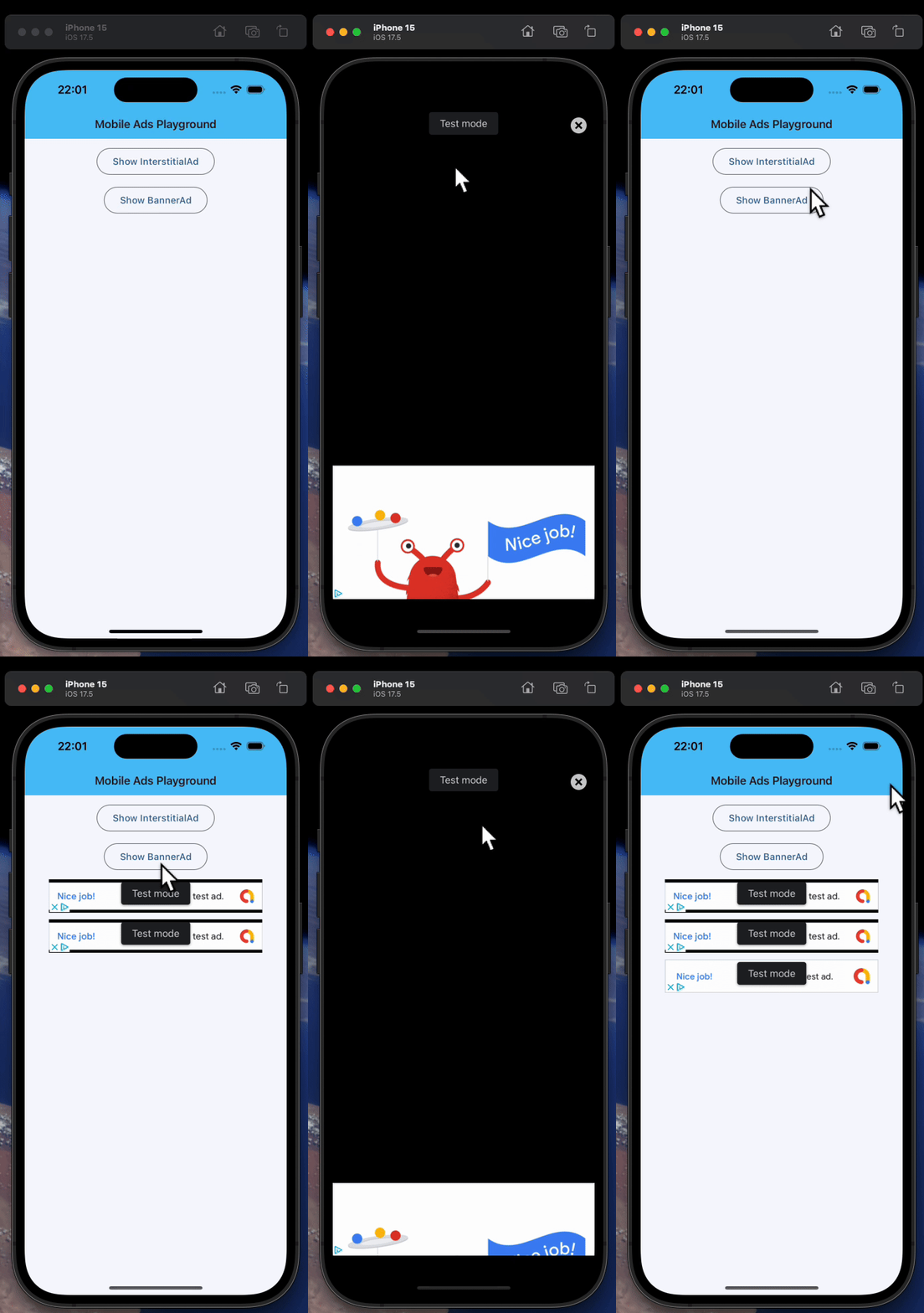
属性
| 名称 | 类型 | 默认值 | 说明 |
|---|---|---|---|
width | Optional[Number] | None | Imposed Control width in virtual pixels. |
height | Optional[Number] | None | Imposed Control height in virtual pixels. |
left | Optional[Number] | None | The distance that the child's left edge is inset from the left of the stack. Note: Effective only if this control is a descendant of one of the following: Stack control, overlay list. |
top | Optional[Number] | None | The distance that the child's top edge is inset from the top of the stack. Note: Effective only if this control is a descendant of one of the following: Stack control, overlay list. |
right | Optional[Number] | None | The distance that the child's right edge is inset from the right of the stack. Note: Effective only if this control is a descendant of one of the following: Stack control, overlay list. |
bottom | Optional[Number] | None | The distance that the child's bottom edge is inset from the bottom of the stack. Note: Effective only if this control is a descendant of one of the following: Stack control, overlay list. |
align | Optional[Alignment] | None | Alignment of the control within its parent. |
margin | Optional[MarginValue] | None | Sets the margin of the control. |
rotate | Optional[RotateValue] | None | Transforms this control using a rotation around its center. The value of rotate property could be one of the following types: * number - a rotation in clockwise radians. Full circle 360° is math.pi * 2 radians, 90° is pi / 2, 45° is pi / 4, etc. * Rotate - allows to specify rotation angle as well as alignment - the location of rotation center. Example: python ft.Image( src="https://picsum.photos/100/100", width=100, height=100, border_radius=5, rotate=Rotate(angle=0.25 * pi, alignment=ft.Alignment.CENTER_LEFT) ) |
scale | Optional[ScaleValue] | None | Scales this control along the 2D plane. Default scale factor is 1.0, meaning no-scale. Setting this property to 0.5, for example, makes this control twice smaller, while 2.0 makes it twice larger. Different scale multipliers can be specified for x and y axis, by setting Control.scale property to an instance of Scale class. Either scale or scale_x and scale_y could be specified, but not all of them. Example: python ft.Image( src="https://picsum.photos/100/100", width=100, height=100, border_radius=5, scale=ft.Scale(scale_x=2, scale_y=0.5) ) |
offset | Optional[OffsetValue] | None | Applies a translation transformation before painting the control. The translation is expressed as an Offset scaled to the control's size. So, Offset(x=0.25, y=0), for example, will result in a horizontal translation of one quarter the width of this control. Example The following example displays container at 0, 0 top left corner of a stack as transform applies -1 * 100, -1 * 100 (offset * control's size) horizontal and vertical translations to the control: python import flet as ft def main(page: ft.Page): page.add( ft.Stack( width=1000, height=1000, controls=[ ft.Container( bgcolor=ft.Colors.RED, width=100, height=100, left=100, top=100, offset=ft.Offset(-1, -1), ) ], ) ) ft.run(main) |
flip | Optional[Flip] | None | Flips this control horizontally and/or vertically. Set to an instance of Flip to mirror across x-axis, y-axis, or both. |
transform | Optional[Transform] | None | Applies a generic matrix transform to this control. Set to an instance of Transform with a recorded Matrix4 to describe arbitrary transform sequences. |
aspect_ratio | Optional[Number] | None | The aspect ratio of the control. It is defined as the ratio of width to height. Note: In current implementation, if aspect_ratio is set, width and height on the same control are ignored for final rendered size. |
animate_opacity | Optional[AnimationValue] | None | 启用 opacity 属性的隐式动画。 详见 此处. |
animate_size | Optional[AnimationValue] | None | 启用此控件尺寸的隐式动画。 If width or height is set, changes to those dimensions are animated. If neither dimension is set, changes to the control's natural size are animated instead. 详见 此处. |
animate_position | Optional[AnimationValue] | None | 启用定位属性(left、right、top、bottom)的隐式动画。 详见 此处. |
animate_align | Optional[AnimationValue] | None | 启用 align 属性的隐式动画。 详见 此处. |
animate_margin | Optional[AnimationValue] | None | 启用 margin 属性的隐式动画。 详见 此处. |
animate_rotation | Optional[AnimationValue] | None | 启用 rotate 属性的隐式动画。 详见 此处. |
animate_scale | Optional[AnimationValue] | None | 启用 scale 属性的隐式动画。 详见 此处. |
animate_offset | Optional[AnimationValue] | None | 启用 offset 属性的隐式动画。 详见 此处. |
size_change_interval | int | 10 | Sampling interval in milliseconds for on_size_change event. Setting to 0 calls on_size_change immediately on every change. |
expand | Annotated[Optional[Union[bool, int]], V.instance_of((bool, int))] | None | 指定此控件是否/如何扩展以填充父布局中的可用空间。 详见 此处. Note: Has effect only if the direct parent of this control is one of the following controls, or their subclasses: Column, Row, View, Page. Raises: ValueError: If it is not of type bool or int. |
expand_loose | bool | False | 允许控件在主轴方向上有可用空间时扩展,但不要求填满所有可用空间。 详见 此处. Note: 若 expand_loose 为 True,则仅当同时满足以下条件时生效: - expand 不为 None,且 - the direct parent of this control is one of the following controls, or their subclasses: Column, Row, View, Page. |
col | ResponsiveNumber | 12 | 若此控件的父控件是 ResponsiveRow,此属性用于决定该控件横跨多少个虚拟列。 可以是数字,也可以是为不同断点配置不同值的字典,例如 col={"sm": 6}。 0 表示在该断点下隐藏控件,不占用任何列。 默认横跨 12 个虚拟列。 \ |
opacity | Annotated[Number, V.between(0.0, 1.0)] | 1.0 | 定义控件的透明度,取值范围 0.0(完全透明)到 1.0(完全不透明)。 抛出异常:ValueError:若不在 0.0 到 1.0 的闭区间内。 |
tooltip | Optional[TooltipValue] | None | 鼠标悬停时显示的 tooltip。 |
badge | Optional[BadgeValue] | None | 显示在控件顶部的徽标。 |
visible | bool | True | Every control has visible property which is True by default - control is rendered on the page. Setting visible to False 完全阻止该控件(及其所有子控件)渲染到页面画布上. 隐藏的控件不能通过键盘或鼠标聚焦或选中,也不会触发任何事件。 |
disabled | bool | False | Every control has disabled property which is False by default - control and all its children are enabled. Note: The value of this property will be propagated down to all children controls recursively. Example: For example, if you have a form with multiple entry controls you can disable them all together by disabling container: python ft.Column( disabled = True, controls=[ ft.TextField(), ft.TextField() ] ) |
rtl | bool | False | 控件的文字方向是否为从右到左(RTL)。 |
data | Any | skip_ | 任意类型的自定义数据。 |
key | Optional['KeyValue'] | None | 用于在更新之间保持控件身份稳定的 key。 |
unit_id | str | required | Ad unit ID for this ad. |
request | AdRequest | AdRequest(() | Targeting information used to fetch an Ad. |
只读属性
| 名称 | 类型 | 默认值 | 说明 |
|---|---|---|---|
parent | Optional['BaseControl'] | — | The direct ancestor(parent) of this control. It defaults to None and will only have a value when this control is mounted (added to the page tree). Page 控件(树的根)为例外 —— 它始终 parent=None。 |
page | 'Page' | — | 此控件所属的页面。 |
事件
| 名称 | 类型 | 默认值 | 说明 |
|---|---|---|---|
on_will_dismiss | Optional[ft.ControlEventHandler['BannerAd']] | None | Called before dismissing a full screen view. Note: Only available on iOS. |
on_paid | Optional[ft.ControlEventHandler[PaidAdEvent['BannerAd']]] | None | Called when this ad is estimated to have earned money. Available for allowlisted accounts only. |
on_size_change | Optional[EventHandler[LayoutSizeChangeEvent['LayoutControl']]] | None | Called when the size of this control changes. size_change_interval defines how often this event is called. |
on_animation_end | Optional[ControlEventHandler['LayoutControl']] | None | 动画结束时调用,可用于串联多个动画。 事件参数 data 属性包含动画的名称。 详见 此处. |
on_load | Optional[ft.ControlEventHandler['BaseAd']] | None | Called when this ad is loaded successfully. |
on_error | Optional[ft.ControlEventHandler['BaseAd']] | None | Called when an ad request failed. Event handler argument data property contains information about the error. |
on_open | Optional[ft.ControlEventHandler['BaseAd']] | None | Called when this ad opens up. A full screen view/overlay is presented in response to the user clicking on an ad. You may want to pause animations and time sensitive interactions. |
on_close | Optional[ft.ControlEventHandler['BaseAd']] | None | Called when the full screen view has been closed. You should restart anything paused while handling on_open. |
on_impression | Optional[ft.ControlEventHandler['BaseAd']] | None | Called when an impression occurs on this ad. |
on_click | Optional[ft.ControlEventHandler['BaseAd']] | None | Called when this ad is clicked. |
方法
| 名称 | 类型 | 默认值 | 说明 |
|---|---|---|---|
is_isolated | — | — | Return whether this control is marked as isolated. 被隔离的控件不会参与父级驱动的更新遍历,需要自行管理更新边界。 |
init | — | — | Called after control instance initialization and before the first build / update cycle. 可重写此钩子执行依赖于已初始化字段的轻量设置。 不要在这里调用 update()。 |
build | — | — | 在控件初始化期间调用一次,用于定义其子控件。 page 属性在此方法中可用。 |
before_update | — | — | 每次控件即将更新时调用。 Note: 不要在此处调用 update()。 |
before_event | — | — | 在事件处理器执行前拦截事件。 返回 False 取消分发,返回 True 或 None 则继续正常的事件处理。 |
did_mount | — | — | 在控件挂载到页面树之后调用。 可重写以启动需要已挂载页面的资源,例如订阅、定时器或服务监听。 |
will_unmount | — | — | 在控件从页面树移除之前调用。 可重写以释放 did_mount() 中创建的资源,例如订阅、定时器或外部句柄。 |
get_data_channel | — | — | Resolve the [DataChannel] allocated on the Dart side for this widget. Pattern: on_data_channel_open: Optional[ft.EventHandler[DataChannelOpenEvent]] = None def init(self): self.on_data_channel_open = self._on_open def _on_open(self, e): self._channel = self.get_data_channel(e.channel_id) Idempotent — the underlying Connection caches DataChannels by id, so repeated calls return the same instance. No error path: the id always comes from a framework-fired event, so by the time this runs the channel exists on both sides. |
update | None | — | 请求更新该控件的 UI。 在修改控件状态或属性后调用。 控件必须已挂载到页面,并且未被冻结。 |
