主题
主题定制指南 (Theming)
你可以配置你的应用程序和/或其包含的控件,使其遵循特定的主题风格。
全局主题 (App-wide themes)
Page 控件(整个组件树最顶层的控件)拥有两个有用的属性来对此进行配置:theme 和 dark_theme 属性,分别用来配置应用程序在亮色和暗色主题模式下的外观/主题。
这两个属性的类型均为 Theme,它们代表了在全局范围内使用的默认/备用主题,除非在组件树中被显式修改/覆盖。
python
page.theme = ft.Theme(color_scheme_seed=ft.Colors.GREEN)
page.dark_theme = ft.Theme(color_scheme_seed=ft.Colors.BLUE)
嵌套局部主题 (Nested themes)
你可以让应用程序的一部分使用不同于全局的主题,或者为特定的控件覆盖某些主题样式。
一些容器类控件(如 Container)拥有 theme 和 theme_mode 属性,其类型分别为 Theme 和 ThemeMode。
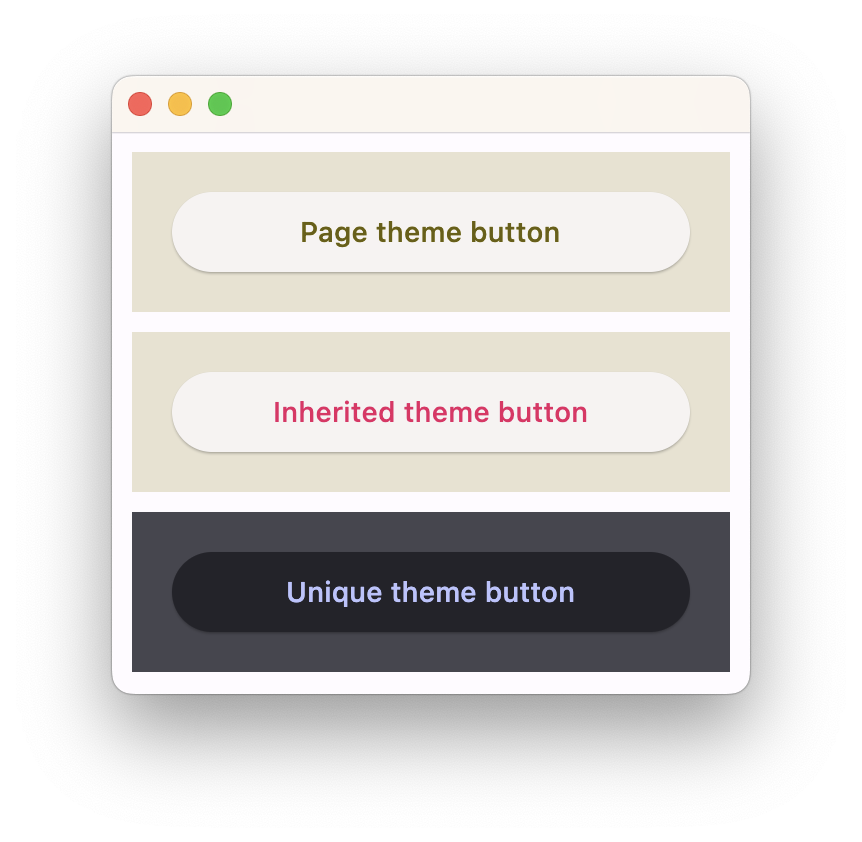
在 Container 中指定 theme_mode 意味着你不希望继承父级的主题模式,而是想为该容器内部的所有控件使用一套全新的、独特的配色方案。然而,如果容器没有设置 theme_mode 属性,则其 theme 属性中定义的样式将覆盖从父级继承的主题样式:
python
import flet as ft

def main(page: ft.Page):
    # 黄色页面主题,SYSTEM(系统默认)模式
    page.theme = ft.Theme(
        color_scheme_seed=ft.Colors.YELLOW,
    )

    page.add(
        # 页面默认主题
        ft.Container(
            content=ft.Button("Page theme button"),
            bgcolor=ft.Colors.SURFACE_CONTAINER_HIGHEST,
            padding=20,
            width=300,
        ),

        # 继承页面主题,但覆盖了 primary 颜色(粉色)
        ft.Container(
            theme=ft.Theme(color_scheme=ft.ColorScheme(primary=ft.Colors.PINK)),
            content=ft.Button("Inherited theme button"),
            bgcolor=ft.Colors.SURFACE_CONTAINER_HIGHEST,
            padding=20,
            width=300,
        ),

        # 独特的始终为 DARK 模式的主题
        ft.Container(
            theme=ft.Theme(color_scheme_seed=ft.Colors.INDIGO),
            theme_mode=ft.ThemeMode.DARK,
            content=ft.Button("Unique theme button"),
            bgcolor=ft.Colors.SURFACE_CONTAINER_HIGHEST,
            padding=20,
            width=300,
        ),
    )

ft.run(main)