
主题
InterstitialAd 继承自: ft.Service, BaseAd, BaseControl, ft.BaseControl
展示一个全屏插页式广告。
注意: 每个实例(通过 show)只允许展示一次。若要展示另一个广告,需要创建一个新的实例。复用已展示过的实例会导致错误或非预期行为。
示例:测试 ID AdMob 提供了 用于测试的单元 ID。请根据你所测试的平台,将 unit_id 设为相应的值:
- Android:
"ca-app-pub-3940256099942544/1033173712" - iOS:
"ca-app-pub-3940256099942544/4411468910"
记得在上线时替换成正式的 ID。
抛出异常: FletUnsupportedPlatformException:在 Web 和/或非移动端平台上使用此控件时抛出。
示例
python
import flet as ft
import flet_ads as fta

# Test ad unit IDs
ids = {
    ft.PagePlatform.ANDROID: {
        "banner": "ca-app-pub-3940256099942544/6300978111",
        "interstitial": "ca-app-pub-3940256099942544/1033173712",
    },
    ft.PagePlatform.IOS: {
        "banner": "ca-app-pub-3940256099942544/2934735716",
        "interstitial": "ca-app-pub-3940256099942544/4411468910",
    },
}


def main(page: ft.Page):
    page.appbar = ft.AppBar(
        adaptive=True,
        title="Mobile Ads Playground",
        bgcolor=ft.Colors.LIGHT_BLUE_300,
    )
    page.horizontal_alignment = ft.CrossAxisAlignment.CENTER
    page.scroll = ft.ScrollMode.AUTO

    def show_new_interstitial_ad():
        async def show_iad(e: ft.Event[fta.InterstitialAd]):
            await iad.show()

        iad = fta.InterstitialAd(
            unit_id=ids[page.platform]["interstitial"],
            on_load=show_iad,
            on_error=lambda e: print("InterstitialAd error", e.data),
            on_open=lambda e: print("InterstitialAd opened"),
            on_close=lambda e: print("InterstitialAd closed"),
            on_impression=lambda e: print("InterstitialAd impression"),
            on_click=lambda e: print("InterstitialAd clicked"),
        )

    def get_new_banner_ad() -> fta.BannerAd:
        return fta.BannerAd(
            unit_id=ids[page.platform]["banner"],
            width=320,
            height=50,
            on_click=lambda e: print("BannerAd clicked"),
            on_load=lambda e: print("BannerAd loaded"),
            on_error=lambda e: print("BannerAd error", e.data),
            on_open=lambda e: print("BannerAd opened"),
            on_close=lambda e: print("BannerAd closed"),
            on_impression=lambda e: print("BannerAd impression"),
            on_will_dismiss=lambda e: print("BannerAd will dismiss"),
        )

    page.add(
        ft.SafeArea(
            content=ft.Column(
                controls=[
                    ft.OutlinedButton(
                        content="Show InterstitialAd",
                        on_click=show_new_interstitial_ad,
                        disabled=page.web
                        or not page.platform.is_mobile(),  # mobile only
                    ),
                    ft.OutlinedButton(
                        content="Show BannerAd",
                        on_click=lambda e: page.add(get_new_banner_ad()),
                        disabled=page.web
                        or not page.platform.is_mobile(),  # mobile only
                    ),
                ]
            )
        ),
    )


if __name__ == "__main__":
    ft.run(main)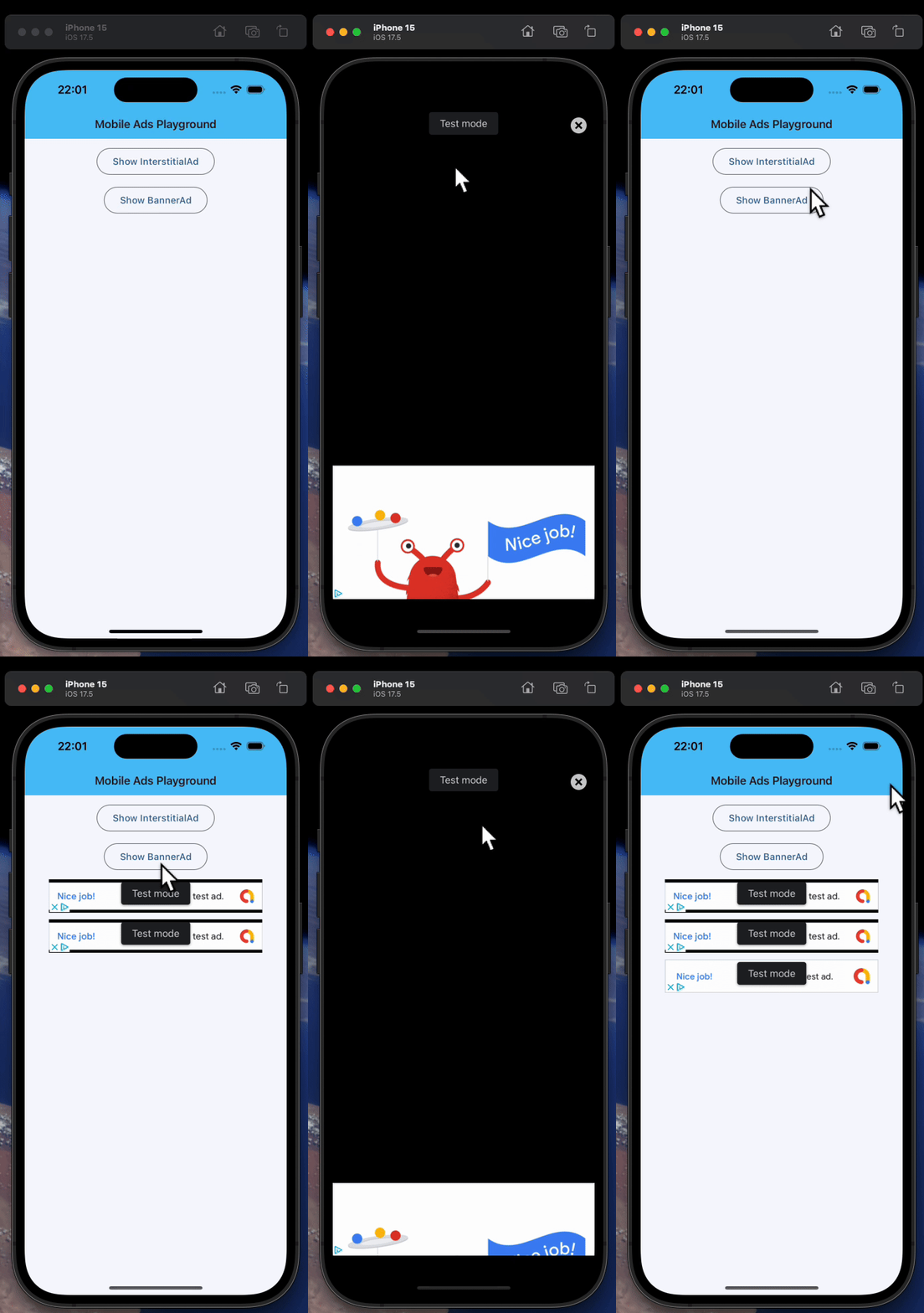
属性
| 名称 | 类型 | 默认值 | 说明 |
|---|---|---|---|
data | Any | skip_ | 任意类型的自定义数据。 |
key | Optional['KeyValue'] | None | 用于在更新之间保持控件身份稳定的 key。 |
unit_id | str | required | Ad unit ID for this ad. |
request | AdRequest | AdRequest(() | Targeting information used to fetch an Ad. |
只读属性
| 名称 | 类型 | 默认值 | 说明 |
|---|---|---|---|
parent | Optional['BaseControl'] | — | The direct ancestor(parent) of this control. It defaults to None and will only have a value when this control is mounted (added to the page tree). Page 控件(树的根)为例外 —— 它始终 parent=None。 |
page | 'Page' | — | 此控件所属的页面。 |
事件
| 名称 | 类型 | 默认值 | 说明 |
|---|---|---|---|
on_load | Optional[ft.ControlEventHandler['BaseAd']] | None | Called when this ad is loaded successfully. |
on_error | Optional[ft.ControlEventHandler['BaseAd']] | None | Called when an ad request failed. Event handler argument data property contains information about the error. |
on_open | Optional[ft.ControlEventHandler['BaseAd']] | None | Called when this ad opens up. A full screen view/overlay is presented in response to the user clicking on an ad. You may want to pause animations and time sensitive interactions. |
on_close | Optional[ft.ControlEventHandler['BaseAd']] | None | Called when the full screen view has been closed. You should restart anything paused while handling on_open. |
on_impression | Optional[ft.ControlEventHandler['BaseAd']] | None | Called when an impression occurs on this ad. |
on_click | Optional[ft.ControlEventHandler['BaseAd']] | None | Called when this ad is clicked. |
方法
| 名称 | 类型 | 默认值 | 说明 |
|---|---|---|---|
show | — | — | Present the loaded interstitial ad as a full-screen overlay. The ad must be loaded before this method is called. |
init | — | — | — |
is_isolated | — | — | Return whether this control is marked as isolated. 被隔离的控件不会参与父级驱动的更新遍历,需要自行管理更新边界。 |
build | — | — | 在控件初始化期间调用一次,用于定义其子控件。 page 属性在此方法中可用。 |
before_update | — | — | 每次控件即将更新时调用。 Note: 不要在此处调用 update()。 |
before_event | — | — | 在事件处理器执行前拦截事件。 返回 False 取消分发,返回 True 或 None 则继续正常的事件处理。 |
did_mount | — | — | 在控件挂载到页面树之后调用。 可重写以启动需要已挂载页面的资源,例如订阅、定时器或服务监听。 |
will_unmount | — | — | 在控件从页面树移除之前调用。 可重写以释放 did_mount() 中创建的资源,例如订阅、定时器或外部句柄。 |
get_data_channel | — | — | Resolve the [DataChannel] allocated on the Dart side for this widget. Pattern: on_data_channel_open: Optional[ft.EventHandler[DataChannelOpenEvent]] = None def init(self): self.on_data_channel_open = self._on_open def _on_open(self, e): self._channel = self.get_data_channel(e.channel_id) Idempotent — the underlying Connection caches DataChannels by id, so repeated calls return the same instance. No error path: the id always comes from a framework-fired event, so by the time this runs the channel exists on both sides. |
update | None | — | 请求更新该控件的 UI。 在修改控件状态或属性后调用。 控件必须已挂载到页面,并且未被冻结。 |
