
主题
NavigationDrawer
NavigationDrawer 继承自:AdaptiveControl, Control, BaseControl
Material Design 导航抽屉组件。
导航抽屉是一个从视图左边缘或右边缘水平滑入的面板,用于显示应用中的主要目的页面。
示例:
python
ft.NavigationDrawer(
    tile_padding=ft.Padding(top=10),
    controls=[
        ft.NavigationDrawerDestination(
            icon=ft.Icons.HOME_OUTLINED,
            label="Item 1",
        ),
        ft.NavigationDrawerDestination(
            icon=ft.Icons.MAIL_OUTLINED,
            label="Item 2",
        ),
        ft.NavigationDrawerDestination(
            icon=ft.Icons.SETTINGS_OUTLINED,
            label="Item 3",
        ),
    ],
)
示例
python
import flet as ft


def main(page: ft.Page):
    async def handle_show_drawer():
        await page.show_drawer()

    def handle_dismissal(e: ft.Event[ft.NavigationDrawer]):
        print("Drawer dismissed!")

    async def handle_change(e: ft.Event[ft.NavigationDrawer]):
        print(f"Selected Index changed: {e.control.selected_index}")
        await page.close_drawer()

    page.drawer = ft.NavigationDrawer(
        on_dismiss=handle_dismissal,
        on_change=handle_change,
        controls=[
            ft.Container(height=12),
            ft.NavigationDrawerDestination(
                label="Item 1",
                icon=ft.Icons.DOOR_BACK_DOOR_OUTLINED,
                selected_icon=ft.Icon(ft.Icons.DOOR_BACK_DOOR),
            ),
            ft.Divider(thickness=2),
            ft.NavigationDrawerDestination(
                icon=ft.Icon(ft.Icons.MAIL_OUTLINED),
                label="Item 2",
                selected_icon=ft.Icons.MAIL,
            ),
            ft.NavigationDrawerDestination(
                icon=ft.Icon(ft.Icons.PHONE_OUTLINED),
                label="Item 3",
                selected_icon=ft.Icons.PHONE,
            ),
        ],
    )

    page.add(
        ft.SafeArea(
            content=ft.Button(
                content="Show drawer",
                on_click=handle_show_drawer,
            )
        )
    )


if __name__ == "__main__":
    ft.run(main)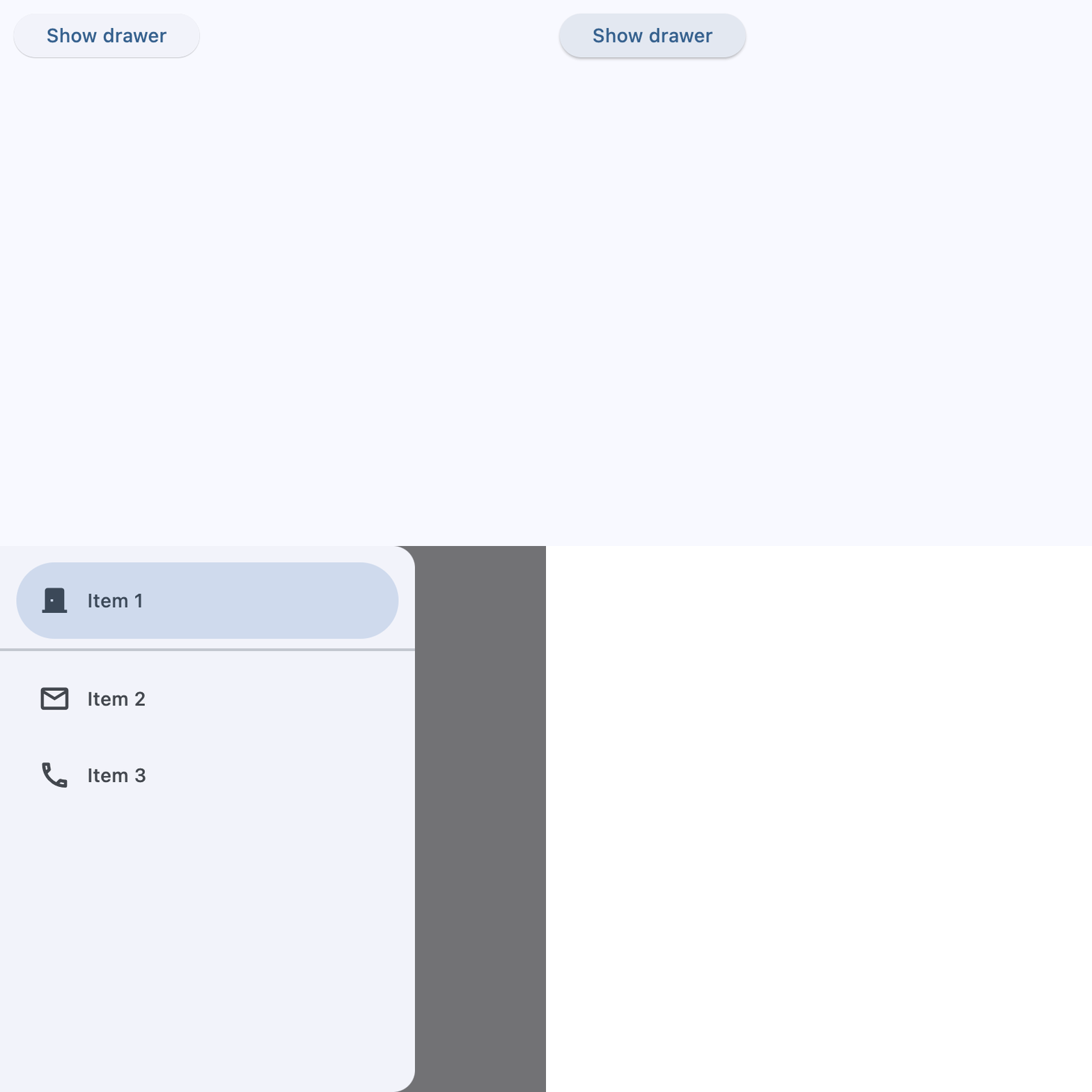
python
import flet as ft


def main(page: ft.Page):
    async def handle_show_drawer():
        await page.show_end_drawer()

    def handle_dismissal(e: ft.Event[ft.NavigationDrawer]):
        print("Drawer dismissed!")

    async def handle_change(e: ft.Event[ft.NavigationDrawer]):
        print(f"Selected Index changed: {e.control.selected_index}")
        await page.close_end_drawer()

    page.end_drawer = ft.NavigationDrawer(
        on_dismiss=handle_dismissal,
        on_change=handle_change,
        controls=[
            ft.NavigationDrawerDestination(
                icon=ft.Icons.ADD_TO_HOME_SCREEN_SHARP,
                label="Item 1",
            ),
            ft.NavigationDrawerDestination(
                icon=ft.Icon(ft.Icons.ADD_COMMENT),
                label="Item 2",
            ),
        ],
    )

    page.add(
        ft.SafeArea(
            content=ft.Button(
                content="Show end drawer",
                on_click=handle_show_drawer,
            )
        )
    )


if __name__ == "__main__":
    ft.run(main)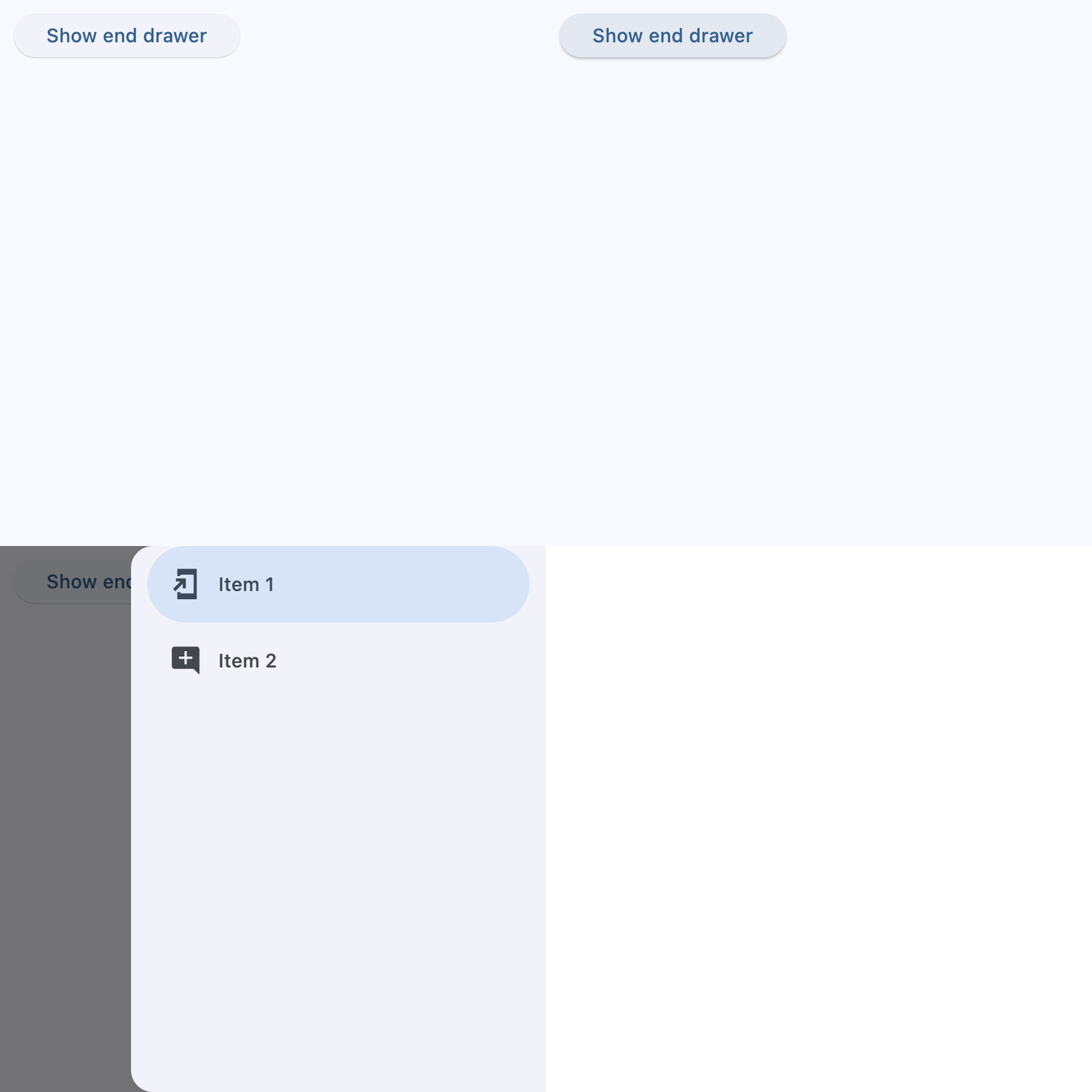
python
import flet as ft


def main(page: ft.Page):
    page.theme_mode = ft.ThemeMode.LIGHT
    page.theme = ft.Theme(
        color_scheme_seed=ft.Colors.INDIGO,
        navigation_drawer_theme=ft.NavigationDrawerTheme(
            bgcolor=ft.Colors.RED_300,
            indicator_color=ft.Colors.INDIGO_100,
            icon_theme={
                ft.ControlState.DEFAULT: ft.IconTheme(
                    color=ft.Colors.INDIGO_900,
                    size=22,
                ),
                ft.ControlState.SELECTED: ft.IconTheme(
                    color=ft.Colors.YELLOW,
                    size=28,
                ),
            },
            label_text_style={
                ft.ControlState.DEFAULT: ft.TextStyle(
                    color=ft.Colors.YELLOW,
                    size=11,
                    italic=True,
                ),
                ft.ControlState.SELECTED: ft.TextStyle(
                    color=ft.Colors.INDIGO_900,
                    size=15,
                    weight=ft.FontWeight.BOLD,
                ),
            },
        ),
    )

    page.drawer = ft.NavigationDrawer(
        controls=[
            ft.Container(
                padding=ft.Padding.only(left=28, top=20, bottom=12),
                content=ft.Text(
                    "Workspace", theme_style=ft.TextThemeStyle.TITLE_MEDIUM
                ),
            ),
            ft.NavigationDrawerDestination(
                icon=ft.Icons.DASHBOARD_OUTLINED,
                selected_icon=ft.Icons.DASHBOARD,
                label="Dashboard",
            ),
            ft.NavigationDrawerDestination(
                icon=ft.Icons.NOTIFICATIONS_OUTLINED,
                selected_icon=ft.Icons.NOTIFICATIONS,
                label="Notifications",
            ),
            ft.NavigationDrawerDestination(
                icon=ft.Icons.SETTINGS_OUTLINED,
                selected_icon=ft.Icons.SETTINGS,
                label="Settings",
            ),
        ],
    )

    async def handle_show_drawer(e: ft.Event[ft.Button]):
        await page.show_drawer()

    page.add(
        ft.SafeArea(
            content=ft.Button(
                "Show drawer",
                icon=ft.Icons.MENU,
                on_click=handle_show_drawer,
            ),
        )
    )


if __name__ == "__main__":
    ft.run(main)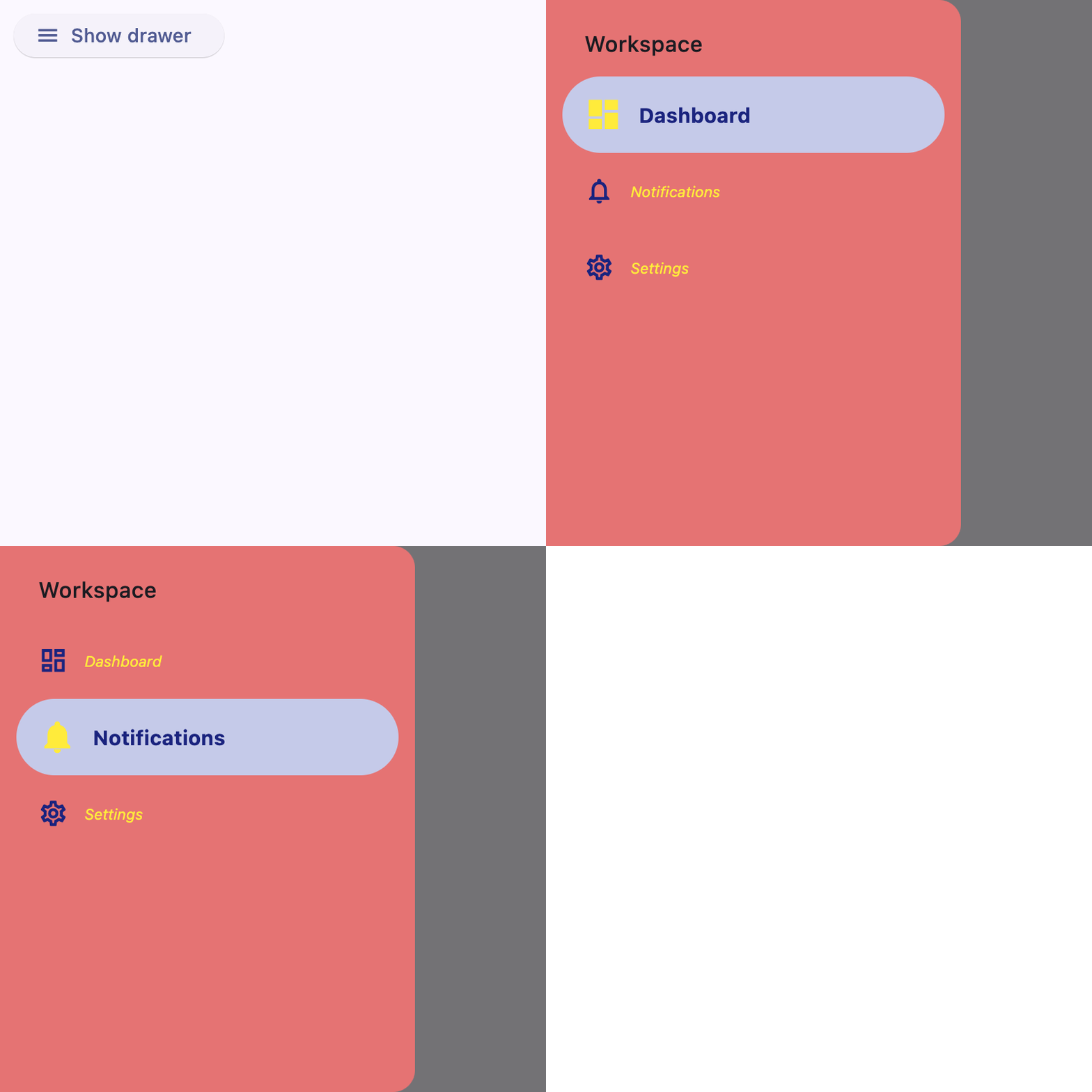
python
import flet as ft

DESTINATIONS = [
    ("Messages", ft.Icons.WIDGETS_OUTLINED, ft.Icons.WIDGETS),
    ("Profile", ft.Icons.FORMAT_PAINT_OUTLINED, ft.Icons.FORMAT_PAINT),
    ("Settings", ft.Icons.SETTINGS_OUTLINED, ft.Icons.SETTINGS),
]


def main(page: ft.Page):
    page.theme_mode = ft.ThemeMode.LIGHT
    page.padding = 0

    screen_index = 0

    def build_page_index_text() -> ft.Text:
        return ft.Text(f"Page Index = {screen_index}", size=24)

    def set_screen(index: int):
        nonlocal screen_index
        screen_index = index
        render()

    def build_navigation_bar() -> ft.NavigationBar:
        def handle_nav_bar_change(e: ft.Event[ft.NavigationBar]):
            set_screen(e.control.selected_index)

        return ft.NavigationBar(
            selected_index=screen_index,
            on_change=handle_nav_bar_change,
            destinations=[
                ft.NavigationBarDestination(
                    label=label,
                    icon=icon,
                    selected_icon=selected_icon,
                )
                for label, icon, selected_icon in DESTINATIONS
            ],
        )

    def build_navigation_rail() -> ft.NavigationRail:
        def handle_nav_rail_change(e: ft.Event[ft.NavigationRail]):
            if e.control.selected_index is not None:
                set_screen(e.control.selected_index)

        return ft.NavigationRail(
            min_width=50,
            selected_index=screen_index,
            use_indicator=True,
            on_change=handle_nav_rail_change,
            destinations=[
                ft.NavigationRailDestination(
                    label=label,
                    icon=icon,
                    selected_icon=selected_icon,
                )
                for label, icon, selected_icon in DESTINATIONS
            ],
        )

    def build_end_drawer() -> ft.NavigationDrawer:
        async def handle_drawer_change(e: ft.Event[ft.NavigationDrawer]):
            set_screen(e.control.selected_index)
            await page.close_end_drawer()

        return ft.NavigationDrawer(
            selected_index=screen_index,
            on_change=handle_drawer_change,
            controls=[
                ft.Container(
                    padding=ft.Padding.only(left=28, top=16, right=16, bottom=10),
                    content=ft.Text(
                        "Header", theme_style=ft.TextThemeStyle.TITLE_SMALL
                    ),
                ),
                *[
                    ft.NavigationDrawerDestination(
                        label=label,
                        icon=icon,
                        selected_icon=selected_icon,
                    )
                    for label, icon, selected_icon in DESTINATIONS
                ],
            ],
        )

    def build_bottom_bar_layout() -> ft.SafeArea:
        return ft.SafeArea(
            expand=True,
            content=ft.Container(
                expand=True,
                alignment=ft.Alignment.CENTER,
                content=build_page_index_text(),
            ),
        )

    def build_drawer_layout() -> ft.SafeArea:
        async def open_drawer(e: ft.Event[ft.Button]):
            await page.show_end_drawer()

        return ft.SafeArea(
            expand=True,
            avoid_intrusions_top=False,
            avoid_intrusions_bottom=False,
            content=ft.Row(
                expand=True,
                controls=[
                    ft.Container(
                        padding=ft.Padding.symmetric(horizontal=5),
                        content=build_navigation_rail(),
                    ),
                    ft.VerticalDivider(thickness=1, width=1),
                    ft.Column(
                        expand=True,
                        alignment=ft.MainAxisAlignment.SPACE_EVENLY,
                        horizontal_alignment=ft.CrossAxisAlignment.CENTER,
                        controls=[
                            build_page_index_text(),
                            ft.Button("Open Drawer", on_click=open_drawer),
                        ],
                    ),
                ],
            ),
        )

    def render():
        page.clean()
        if (page.width or page.window.width) >= 450:  # wide layout
            page.navigation_bar = None
            page.end_drawer = build_end_drawer()
            page.add(build_drawer_layout())
        else:  # narrow layout
            page.end_drawer = None
            page.navigation_bar = build_navigation_bar()
            page.add(build_bottom_bar_layout())
        page.update()

    page.on_resize = lambda e: render()
    render()


if __name__ == "__main__":
    ft.run(main)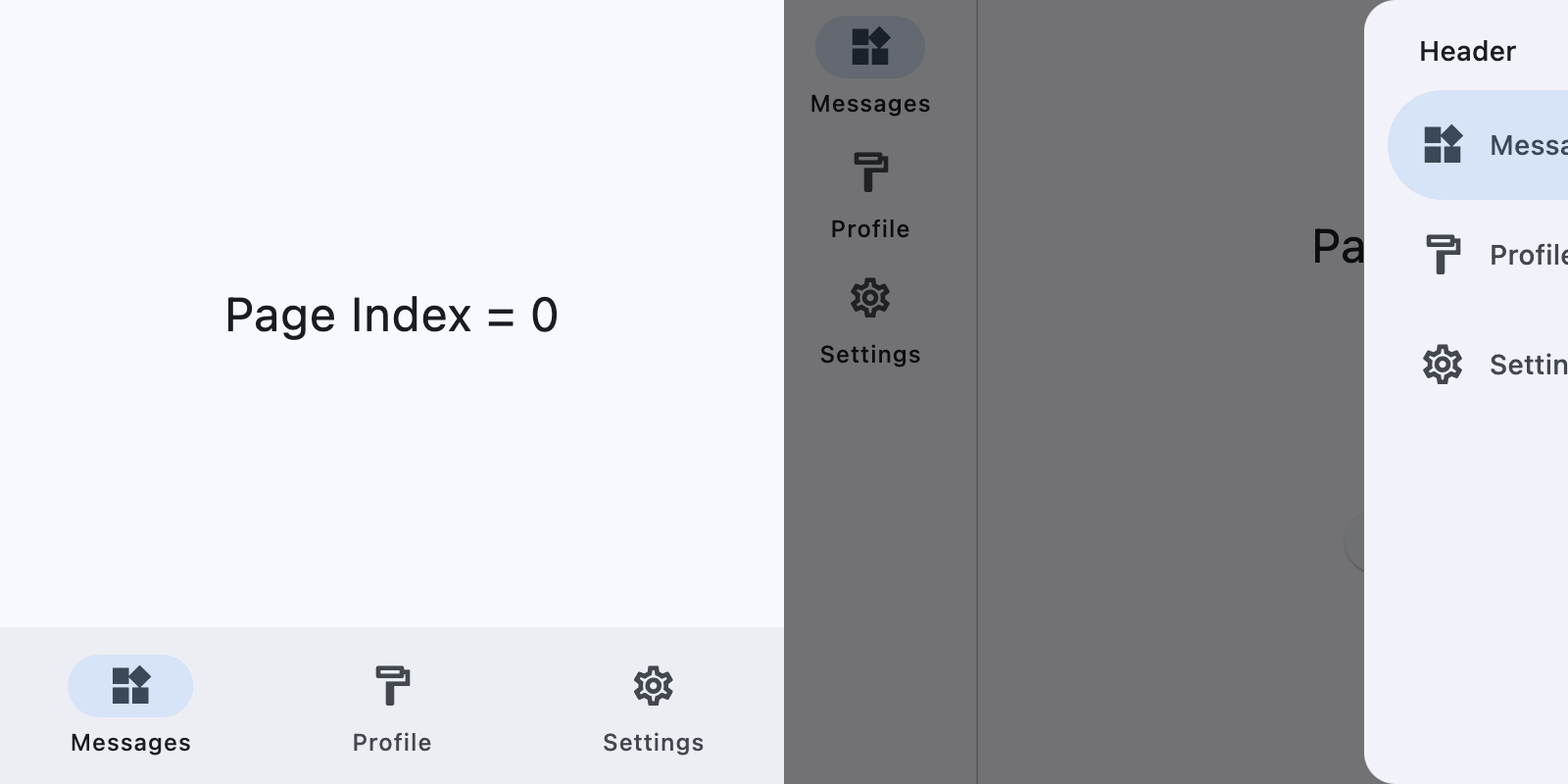
属性
| 名称 | 类型 | 默认值 | 说明 |
|---|---|---|---|
controls | list[Control] | [] | 要在此抽屉中显示的项列表。 该列表通常包含 NavigationDrawerDestination 项,以及诸如标题、带内边距的容器和分隔线之类的其他控件。 |
selected_index | int | 0 | 当前选中的 NavigationDrawerDestination 的索引。 有效的 selected_index 是介于 0 和目的页面数量减 1 之间的整数。对于无效值(例如 -1),所有目的页面都会显示为未选中。 |
bgcolor | Optional[ColorValue] | None | 此导航抽屉的颜色。 |
elevation | Optional[Number] | None | 此导航抽屉的高度。 |
width | Optional[Number] | None | 抽屉的宽度(以逻辑像素为单位)。当为 None 时,回退到 Material 默认值(约 304dp)。 |
indicator_color | Optional[ColorValue] | None | 选中目的页面指示器的颜色。 |
indicator_shape | Optional[OutlinedBorder] | None | 选中目的页面指示器的形状。 |
shadow_color | Optional[ColorValue] | None | 用于表示 elevation 的投影颜色。 |
tile_padding | PaddingValue | Padding.symmetric(horizontal=12() | 定义抽屉内部目的页面磁贴周围的内边距。 |
adaptive | Optional[bool] | None | 启用平台特定渲染,或从父控件继承自适应能力。 |
expand | Annotated[Optional[Union[bool, int]], V.instance_of((bool, int))] | None | 指定此控件是否/如何扩展以填满父布局中的可用空间。 更多信息见此处。 注意: 仅当此控件的直接父级是以下控件或其子类时才生效:Column、Row、View、Page。 抛出异常: ValueError:如果它不是 bool 或 int 类型。 |
expand_loose | bool | False | 允许控件在主轴方向有可用空间时扩展,但不要求它填满所有可用空间。 更多信息见此处。 注意: 如果 expand_loose 为 True,则仅在以下条件满足时才生效: - expand 不为 None,且 - 此控件的直接父级是以下控件或其子类之一:Column、Row、View、Page。 |
col | ResponsiveNumber | 12 | 如果此控件的父级是 ResponsiveRow,则此属性决定该控件在屏幕上跨越多少虚拟列。 可以是一个数字,也可以是一个按断点配置不同值的字典,例如 col={"sm": 6}。 值为 0 时会在该断点隐藏控件,因此它不会占用父级 ResponsiveRow 中的任何列。 此控件默认跨越 12 个虚拟列。 | 断点 | 尺寸 | |---|---| | xs | <576px | | sm | ≥576px | | md | ≥768px | | lg | ≥992px | | xl | ≥1200px | | xxl | ≥1400px | |
opacity | Annotated[Number, V.between(0.0, 1.0)] | 1.0 | 定义控件的透明度。 取值范围从 0.0(完全透明)到 1.0(完全不透明,无任何透明感)。 抛出异常: ValueError:如果它不在 0.0 到 1.0(含)之间。 |
tooltip | Optional[TooltipValue] | None | 鼠标悬停在此控件上时显示的工具提示。 |
badge | Optional[BadgeValue] | None | 显示在此控件顶部的徽章。 |
visible | bool | True | 每个控件都有 visible 属性,默认为 True —— 控件会渲染在页面上。将 visible 设为 False 会彻底阻止控件(及其所有子控件,如果有)渲染到页面画布上。隐藏的控件无法通过键盘或鼠标获得焦点或选中,也不会触发任何事件。 |
disabled | bool | False | 每个控件都有 disabled 属性,默认为 False —— 控件及其所有子控件都处于启用状态。 注意: 此属性的值会递归向下传播到所有子控件。 示例: 例如,如果你有一个包含多个输入控件的表单,可以通过禁用容器来一并禁用它们: python ft.Column( disabled = True, controls=[ ft.TextField(), ft.TextField() ] ) |
rtl | bool | False | 控件的文本方向是否为从右到左(RTL)。 |
data | Any | skip_ | 任意类型的自定义数据。 |
key | Optional['KeyValue'] | None | 用于在更新之间保持控件标识稳定的键。 |
只读属性
| 名称 | 类型 | 默认值 | 说明 |
|---|---|---|---|
parent | Optional['BaseControl'] | — | 此控件的直接祖先(父级)。 默认为 None,只有在此控件被挂载(加入页面树)后才有值。 Page 控件(页面树的根)是个例外 —— 它的 parent 始终为 None。 |
page | 'Page' | — | 此控件所属的页面。 |
事件
| 名称 | 类型 | 默认值 | 说明 |
|---|---|---|---|
on_change | Optional[ControlEventHandler['NavigationDrawer']] | None | 当选中的目的页面发生变化时调用。 |
on_dismiss | Optional[ControlEventHandler['NavigationDrawer']] | None | 当此抽屉被关闭时调用。 |
方法
| 名称 | 类型 | 默认值 | 说明 |
|---|---|---|---|
is_isolated | — | — | 返回此控件是否被标记为隔离。 隔离控件会被排除在父级驱动的更新遍历之外,并需要自行管理更新边界。 |
init | — | — | 在控件实例初始化之后、首次 build/update 循环之前调用。 重写此钩子可执行依赖于已初始化字段的轻量级设置。请不要在此处调用 update()。 |
build | — | — | 在控件初始化期间调用一次,用于定义其子控件。在此方法中 page 属性可用。 |
before_update | — | — | 每当此控件被更新时都会调用此方法。 注意: 务必不要在此处调用或请求 update()。 |
before_event | — | — | 在事件处理器执行之前拦截事件。 返回 False 可取消分发。返回 True 或 None 则继续正常的事件处理。 |
did_mount | — | — | 在控件挂载到页面树之后调用。 重写此方法以启动需要已挂载页面的资源,例如订阅、定时器或服务监听器。 |
will_unmount | — | — | 在控件从页面树移除之前调用。 重写此方法以释放 did_mount() 中创建的资源,例如订阅、定时器或外部句柄。 |
get_data_channel | — | — | 解析为此 widget 在 Dart 侧分配的 [DataChannel]。模式: on_data_channel_open: Optional[ft.EventHandler[DataChannelOpenEvent]] = None def init(self): self.on_data_channel_open = self._on_open def _on_open(self, e): self._channel = self.get_data_channel(e.channel_id) 幂等 —— 底层的 Connection 会按 id 缓存 DataChannel,因此重复调用会返回同一实例。没有错误路径:该 id 始终来自框架触发的事件,所以当此方法运行时,通道在两端都已存在。 |
update | None | — | 为此控件请求一次 UI 更新。 在更改控件状态或属性后调用。控件必须已挂载到页面且未被标记为冻结。 |
