
主题
Badge 继承自: BaseControl
Badges are used to show notifications, counts, or status information on navigation items such as NavigationBar or NavigationRail destinations or a button's icon.
python
ft.FilledIconButton(
    icon=ft.Icons.PHONE,
    badge=ft.Badge(label="3"),
)
示例
python
import flet as ft


def main(page: ft.Page):
    page.title = "Badge example"
    page.navigation_bar = ft.NavigationBar(
        destinations=[
            ft.NavigationBarDestination(
                icon=ft.Icon(
                    ft.Icons.EXPLORE,
                    badge=ft.Badge(small_size=10),
                ),
                label="Explore",
            ),
            ft.NavigationBarDestination(
                icon=ft.Icons.COMMUTE,
                label="Commute",
            ),
            ft.NavigationBarDestination(
                icon=ft.Icon(
                    ft.Icons.PHONE,
                    badge="10",
                )
            ),
        ]
    )
    page.add(ft.SafeArea(content=ft.Column(controls=[ft.Text("Body!")])))


if __name__ == "__main__":
    ft.run(main)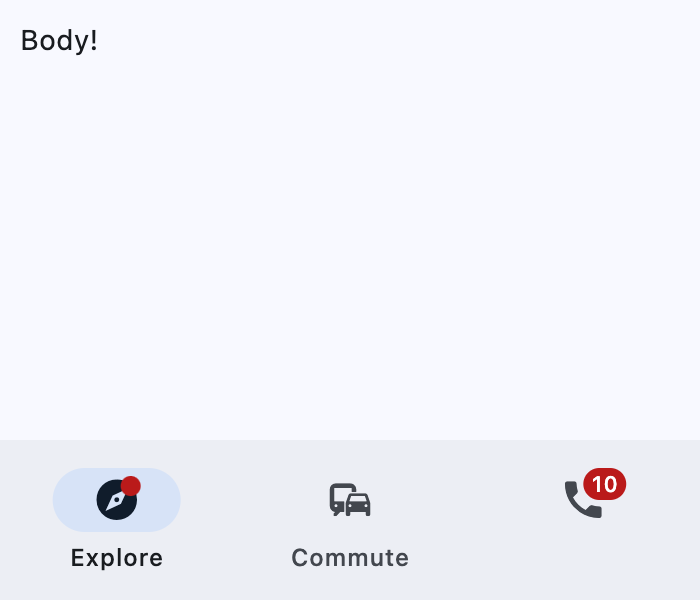
属性
| 名称 | 类型 | 默认值 | 说明 |
|---|---|---|---|
label | Optional[StrOrControl] | None | The label of this badge. Typically a 1 to 4 characters text. If the label is not provided, the badge is shown as a filled circle of small_size diameter. If label is provided, it is a StadiumBorder shaped badge with height equal to large_size. |
offset | Optional[OffsetValue] | None | Combined with alignment to determine the location of the label relative to the content. Note: Has effect only used if label is also provided. |
alignment | Optional[Alignment] | None | Aligns the label relative to the content of the badge. The alignment positions the label in similar way content is positioned using alignment, except that the badge alignment is resolved as if the label was a large_size square and offset is added to the result. Note: Has effect only used if label is also provided. |
bgcolor | Optional[ColorValue] | None | The background color of the label. |
label_visible | bool | True | Whether the label should be visible. It can be used to create a badge only shown under certain conditions. |
large_size | Optional[Number] | None | The badge's label height if label is provided. If the default value is overridden then it may be useful to also override padding and alignment. Defaults to large_size, or if that is None, falls back to 16. |
padding | Optional[PaddingValue] | None | The padding added to the label. Defaults to padding, or if that is None, falls back to 4 pixels on the left and right. Note: Has effect only if label is not None. |
small_size | Optional[Number] | None | The badge's label diameter if label is not provided. Defaults to small_size, or if that is None, falls back to 6. |
text_color | Optional[ColorValue] | None | The color of the text shown in the label. It overrides the color of the label's text_style. |
text_style | Optional[TextStyle] | None | The text style to use for text in the label. |
data | Any | skip_ | 任意类型的自定义数据。 |
key | Optional['KeyValue'] | None | 用于在更新之间保持控件身份稳定的 key。 |
只读属性
| 名称 | 类型 | 默认值 | 说明 |
|---|---|---|---|
parent | Optional['BaseControl'] | — | The direct ancestor(parent) of this control. It defaults to None and will only have a value when this control is mounted (added to the page tree). Page 控件(树的根)为例外 —— 它始终 parent=None。 |
page | 'Page' | — | 此控件所属的页面。 |
方法
| 名称 | 类型 | 默认值 | 说明 |
|---|---|---|---|
is_isolated | — | — | Return whether this control is marked as isolated. 被隔离的控件不会参与父级驱动的更新遍历,需要自行管理更新边界。 |
init | — | — | Called after control instance initialization and before the first build / update cycle. 可重写此钩子执行依赖于已初始化字段的轻量设置。 不要在这里调用 update()。 |
build | — | — | 在控件初始化期间调用一次,用于定义其子控件。 page 属性在此方法中可用。 |
before_update | — | — | 每次控件即将更新时调用。 Note: 不要在此处调用 update()。 |
before_event | — | — | 在事件处理器执行前拦截事件。 返回 False 取消分发,返回 True 或 None 则继续正常的事件处理。 |
did_mount | — | — | 在控件挂载到页面树之后调用。 可重写以启动需要已挂载页面的资源,例如订阅、定时器或服务监听。 |
will_unmount | — | — | 在控件从页面树移除之前调用。 可重写以释放 did_mount() 中创建的资源,例如订阅、定时器或外部句柄。 |
get_data_channel | — | — | Resolve the [DataChannel] allocated on the Dart side for this widget. Pattern: on_data_channel_open: Optional[ft.EventHandler[DataChannelOpenEvent]] = None def init(self): self.on_data_channel_open = self._on_open def _on_open(self, e): self._channel = self.get_data_channel(e.channel_id) Idempotent — the underlying Connection caches DataChannels by id, so repeated calls return the same instance. No error path: the id always comes from a framework-fired event, so by the time this runs the channel exists on both sides. |
update | None | — | 请求更新该控件的 UI。 在修改控件状态或属性后调用。 控件必须已挂载到页面,并且未被冻结。 |
