
主题
MatplotlibChartWithToolbar 继承自: ft.Column, LayoutControl, ScrollableControl, AdaptiveControl, Control, BaseControl
将 MatplotlibChart 与一个现成的工具栏界面组合在一起的复合控件。
注意: 该控件需要先安装 matplotlib 这个 Python 包。
更多信息请参阅此安装指南。
示例
python
import os
import sys

# Load Matplotlib's `ft2font` extension with RTLD_DEEPBIND, so it binds to the
# FreeType and harfbuzz it was built against.
#
# A packaged Linux app embeds Python in the Flutter process, where GTK has
# already loaded the system libfreetype/libharfbuzz into the global symbol
# namespace. `ft2font` statically links its own copies but also exports their
# symbols, so its internal calls resolve to the system ones instead. The ABI
# mismatch corrupts glyph metrics - a 10pt "-40" measures millions of points
# wide - and every text draw then fails with
# "FT_Render_Glyph ... error 0x62: raster overflow".
#
# Must run before Matplotlib is imported: the extension is cached after its
# first load. No-op wherever the flag is absent (macOS, Windows, Android, iOS,
# Pyodide) - none of those resolve symbols through a flat global namespace.
if hasattr(os, "RTLD_DEEPBIND"):
    _dlopenflags = sys.getdlopenflags()
    sys.setdlopenflags(_dlopenflags | os.RTLD_DEEPBIND)
    try:
        from matplotlib import ft2font  # noqa: F401
    finally:
        sys.setdlopenflags(_dlopenflags)


import matplotlib.pyplot as plt
import numpy as np

import flet as ft
import flet_charts as fch


def main(page: ft.Page):
    # Fixing random state for reproducibility
    np.random.seed(19680801)

    dt = 0.01
    t = np.arange(0, 30, dt)
    nse1 = np.random.randn(len(t))  # white noise 1
    nse2 = np.random.randn(len(t))  # white noise 2

    # Two signals with a coherent part at 10Hz and a random part
    s1 = np.sin(2 * np.pi * 10 * t) + nse1
    s2 = np.sin(2 * np.pi * 10 * t) + nse2

    fig, axs = plt.subplots(2, 1)
    axs[0].plot(t, s1, t, s2)
    axs[0].set_xlim(0, 2)
    axs[0].set_xlabel("time")
    axs[0].set_ylabel("s1 and s2")
    axs[0].grid(True)

    cxy, f = axs[1].cohere(s1, s2, 256, 1.0 / dt)
    axs[1].set_ylabel("coherence")

    fig.tight_layout()

    page.add(
        ft.SafeArea(
            expand=True,
            content=fch.MatplotlibChartWithToolbar(figure=fig, expand=True),
        )
    )


if __name__ == "__main__":
    ft.run(main)
python
import asyncio
import logging
import os
import sys
import time
from collections import deque
from dataclasses import dataclass

# Load Matplotlib's `ft2font` extension with RTLD_DEEPBIND, so it binds to the
# FreeType and harfbuzz it was built against.
#
# A packaged Linux app embeds Python in the Flutter process, where GTK has
# already loaded the system libfreetype/libharfbuzz into the global symbol
# namespace. `ft2font` statically links its own copies but also exports their
# symbols, so its internal calls resolve to the system ones instead. The ABI
# mismatch corrupts glyph metrics - a 10pt "-40" measures millions of points
# wide - and every text draw then fails with
# "FT_Render_Glyph ... error 0x62: raster overflow".
#
# Must run before Matplotlib is imported: the extension is cached after its
# first load. No-op wherever the flag is absent (macOS, Windows, Android, iOS,
# Pyodide) - none of those resolve symbols through a flat global namespace.
if hasattr(os, "RTLD_DEEPBIND"):
    _dlopenflags = sys.getdlopenflags()
    sys.setdlopenflags(_dlopenflags | os.RTLD_DEEPBIND)
    try:
        from matplotlib import ft2font  # noqa: F401
    finally:
        sys.setdlopenflags(_dlopenflags)


import matplotlib.pyplot as plt

import flet as ft
import flet_charts

logging.basicConfig(level=logging.INFO)


@dataclass
class _Frame:
    t: float
    size: int


class FrameStats:
    """Rolling counters for the matplotlib WebAgg-style frame stream.

    Cumulative averages for per-frame size + total bytes (lifetime of the
    run); a short sliding window for transfer speed and FPS so the bar
    reflects current activity rather than being dragged down by idle time.

    Latency split (also sliding-window):

    * `dart_ms` — time from a frame leaving Python (`apply_full/diff` call)
      to Dart's `[0xFF]` ack arriving. This is Dart-side decode + paint +
      ack transit. Transit is microseconds, so essentially decode + paint.
    * `mpl_ms` — time from one ack arriving to the next frame leaving
      Python. Combines matplotlib's render of the next frame and any
      idle time waiting for matplotlib to react to the next "draw"
      request. Under sustained interactive load (continuous dragging)
      idle ≈ 0 and this is dominated by matplotlib's render cost.
    """

    WINDOW_SECONDS = 2.0

    def __init__(self) -> None:
        self.full_count = 0
        self.full_total = 0
        self.diff_count = 0
        self.diff_total = 0
        self.raw_count = 0
        self.raw_total = 0
        self.bytes_total = 0
        self._recent: deque[_Frame] = deque()
        # Latency tracking: each entry is (timestamp_when_observed, latency_seconds).
        self._dart_latencies: deque[tuple[float, float]] = deque()
        self._mpl_gaps: deque[tuple[float, float]] = deque()
        # In-flight bookkeeping for pairing send with ack.
        self._inflight_send_ts: float | None = None
        self._last_ack_ts: float | None = None

    def record_send(self, size: int, kind: str) -> None:
        """Frame about to leave Python — record size and mark in-flight.

        `kind` is "raw" (uncompressed RGBA full frame, local transports),
        "full" or "diff" (PNG frames, remote transports).
        """
        now = time.monotonic()
        if kind == "raw":
            self.raw_count += 1
            self.raw_total += size
        elif kind == "full":
            self.full_count += 1
            self.full_total += size
        else:
            self.diff_count += 1
            self.diff_total += size
        self.bytes_total += size
        self._recent.append(_Frame(now, size))
        self._evict(now)
        # mpl-side gap: how long since the previous ack.
        if self._last_ack_ts is not None:
            self._mpl_gaps.append((now, now - self._last_ack_ts))
            self._evict_latency_window(self._mpl_gaps, now)
        self._inflight_send_ts = now

    def record_ack(self) -> None:
        """Dart confirms the frame painted — close the dart-side timing."""
        now = time.monotonic()
        if self._inflight_send_ts is not None:
            self._dart_latencies.append((now, now - self._inflight_send_ts))
            self._evict_latency_window(self._dart_latencies, now)
            self._inflight_send_ts = None
        self._last_ack_ts = now

    def _evict(self, now: float) -> None:
        cutoff = now - self.WINDOW_SECONDS
        while self._recent and self._recent[0].t < cutoff:
            self._recent.popleft()

    def _evict_latency_window(
        self, window: deque[tuple[float, float]], now: float
    ) -> None:
        cutoff = now - self.WINDOW_SECONDS
        while window and window[0][0] < cutoff:
            window.popleft()

    @property
    def avg_full(self) -> float:
        return self.full_total / self.full_count if self.full_count else 0.0

    @property
    def avg_diff(self) -> float:
        return self.diff_total / self.diff_count if self.diff_count else 0.0

    @property
    def avg_raw(self) -> float:
        return self.raw_total / self.raw_count if self.raw_count else 0.0

    def speed_and_fps(self) -> tuple[float, float]:
        now = time.monotonic()
        self._evict(now)
        if not self._recent:
            return 0.0, 0.0
        span = max(self.WINDOW_SECONDS, now - self._recent[0].t)
        speed = sum(f.size for f in self._recent) / span
        fps = len(self._recent) / span
        return speed, fps

    def dart_avg_ms(self) -> float:
        now = time.monotonic()
        self._evict_latency_window(self._dart_latencies, now)
        if not self._dart_latencies:
            return 0.0
        return (
            1000.0
            * sum(lat for _, lat in self._dart_latencies)
            / len(self._dart_latencies)
        )

    def mpl_avg_ms(self) -> float:
        now = time.monotonic()
        self._evict_latency_window(self._mpl_gaps, now)
        if not self._mpl_gaps:
            return 0.0
        return 1000.0 * sum(g for _, g in self._mpl_gaps) / len(self._mpl_gaps)


def _human_bytes(n: float) -> str:
    if n < 1024:
        return f"{n:.0f} B"
    if n < 1024 * 1024:
        return f"{n / 1024:.1f} KB"
    if n < 1024**3:
        return f"{n / (1024 * 1024):.1f} MB"
    return f"{n / (1024**3):.2f} GB"


async def main(page: ft.Page):
    from mpl_toolkits.mplot3d import axes3d

    fig = plt.figure()
    ax = fig.add_subplot(projection="3d")
    X, Y, Z = axes3d.get_test_data(0.1)

    # Plot the 3D surface
    ax.plot_surface(
        X, Y, Z, edgecolor="royalblue", lw=0.5, rstride=8, cstride=8, alpha=0.3
    )

    # Plot projections of the contours for each dimension.  By choosing offsets
    # that match the appropriate axes limits, the projected contours will sit on
    # the 'walls' of the graph
    ax.contourf(X, Y, Z, zdir="z", offset=-100, cmap="coolwarm")
    ax.contourf(X, Y, Z, zdir="x", offset=-40, cmap="coolwarm")
    ax.contourf(X, Y, Z, zdir="y", offset=40, cmap="coolwarm")

    ax.set(
        xlim=(-40, 40),
        ylim=(-40, 40),
        zlim=(-100, 100),
        xlabel="X",
        ylabel="Y",
        zlabel="Z",
    )

    chart = flet_charts.MatplotlibChartWithToolbar(figure=fig, expand=True)

    # Status bar: regular Flet Text controls in a Row at the bottom.
    avg_raw_text = ft.Text("avg raw: —", size=12)
    avg_full_text = ft.Text("avg full: —", size=12)
    avg_diff_text = ft.Text("avg diff: —", size=12)
    total_text = ft.Text("total: —", size=12)
    speed_text = ft.Text("speed: —", size=12)
    fps_text = ft.Text("fps: —", size=12)
    dart_text = ft.Text("dart: —", size=12)
    mpl_text = ft.Text("mpl: —", size=12)

    status_bar = ft.Container(
        content=ft.Row(
            [
                avg_raw_text,
                avg_full_text,
                avg_diff_text,
                total_text,
                speed_text,
                fps_text,
                dart_text,
                mpl_text,
            ],
            spacing=20,
            # Scroll instead of overflowing when the window is narrower
            # than the full set of counters.
            scroll=ft.ScrollMode.HIDDEN,
        ),
        padding=ft.Padding.symmetric(horizontal=12, vertical=6),
        bgcolor=ft.Colors.SURFACE_CONTAINER_HIGH,
    )

    page.add(
        ft.SafeArea(
            content=ft.Column(
                [chart, status_bar],
                expand=True,
                spacing=0,
            ),
            expand=True,
        )
    )

    stats = FrameStats()

    # Instrument the canvas to capture per-frame sizes + latency. Both
    # `chart.mpl` and `chart.mpl.mpl_canvas` are populated by their
    # respective `build()` calls, which run only after the control is
    # mounted — hence this wrapping has to happen after `page.add(...)`.
    canvas = chart.mpl.mpl_canvas
    orig_full = canvas.apply_full
    orig_diff = canvas.apply_diff
    orig_raw = canvas.apply_raw_packet

    async def apply_full(image_bytes: bytes) -> None:
        stats.record_send(len(image_bytes), kind="full")
        await orig_full(image_bytes)

    async def apply_diff(image_bytes: bytes) -> None:
        stats.record_send(len(image_bytes), kind="diff")
        await orig_diff(image_bytes)

    async def apply_raw_packet(packet: bytes) -> None:
        stats.record_send(len(packet), kind="raw")
        await orig_raw(packet)

    canvas.apply_full = apply_full
    canvas.apply_diff = apply_diff
    canvas.apply_raw_packet = apply_raw_packet

    # Register an observer for frame-applied acks so we can record the
    # Dart-side timing. Pure observation — backpressure is handled by
    # the apply_*/await pattern in `MatplotlibChart._receive_loop`.
    canvas.set_on_frame_applied(stats.record_ack)

    # Background task: refresh the labels at ~4 Hz so speed/fps decay
    # visibly when traffic stops and stay readable during fast drags
    # (vs. updating once per frame, which thrashes the layout).
    async def refresh_loop() -> None:
        while True:
            speed, fps = stats.speed_and_fps()
            avg_raw_text.value = (
                f"avg raw: {_human_bytes(stats.avg_raw)} (n={stats.raw_count})"
            )
            avg_full_text.value = (
                f"avg full: {_human_bytes(stats.avg_full)} (n={stats.full_count})"
            )
            avg_diff_text.value = (
                f"avg diff: {_human_bytes(stats.avg_diff)} (n={stats.diff_count})"
            )
            total_text.value = f"total: {_human_bytes(stats.bytes_total)}"
            speed_text.value = f"speed: {_human_bytes(speed)}/s"
            fps_text.value = f"fps: {fps:.1f}"
            dart_text.value = f"dart: {stats.dart_avg_ms():.1f} ms"
            mpl_text.value = f"mpl: {stats.mpl_avg_ms():.1f} ms"
            try:
                page.update()
            except RuntimeError:
                # Window closed — session destroyed; stop refreshing.
                return
            await asyncio.sleep(0.25)

    asyncio.create_task(refresh_loop())


if __name__ == "__main__":
    ft.run(main)
python
import os
import sys

# Load Matplotlib's `ft2font` extension with RTLD_DEEPBIND, so it binds to the
# FreeType and harfbuzz it was built against.
#
# A packaged Linux app embeds Python in the Flutter process, where GTK has
# already loaded the system libfreetype/libharfbuzz into the global symbol
# namespace. `ft2font` statically links its own copies but also exports their
# symbols, so its internal calls resolve to the system ones instead. The ABI
# mismatch corrupts glyph metrics - a 10pt "-40" measures millions of points
# wide - and every text draw then fails with
# "FT_Render_Glyph ... error 0x62: raster overflow".
#
# Must run before Matplotlib is imported: the extension is cached after its
# first load. No-op wherever the flag is absent (macOS, Windows, Android, iOS,
# Pyodide) - none of those resolve symbols through a flat global namespace.
if hasattr(os, "RTLD_DEEPBIND"):
    _dlopenflags = sys.getdlopenflags()
    sys.setdlopenflags(_dlopenflags | os.RTLD_DEEPBIND)
    try:
        from matplotlib import ft2font  # noqa: F401
    finally:
        sys.setdlopenflags(_dlopenflags)


import matplotlib.pyplot as plt
import numpy as np

import flet as ft
import flet_charts as fch

state = {}


def main(page: ft.Page):
    # Fixing random state for reproducibility
    np.random.seed(19680801)

    X = np.random.rand(100, 200)
    xs = np.mean(X, axis=1)
    ys = np.std(X, axis=1)

    fig, (ax, ax2) = plt.subplots(2, 1)
    ax.set_title("click on point to plot time series")
    (line,) = ax.plot(xs, ys, "o", picker=True, pickradius=5)

    class PointBrowser:
        """
        Click on a point to select and highlight it -- the data that
        generated the point will be shown in the lower Axes.  Use the 'n'
        and 'p' keys to browse through the next and previous points
        """

        def __init__(self):
            self.lastind = 0

            self.text = ax.text(
                0.05, 0.95, "selected: none", transform=ax.transAxes, va="top"
            )
            (self.selected,) = ax.plot(
                [xs[0]], [ys[0]], "o", ms=12, alpha=0.4, color="yellow", visible=False
            )

        def on_press(self, event):
            if self.lastind is None:
                return
            if event.key not in ("n", "p"):
                return
            inc = 1 if event.key == "n" else -1

            self.lastind += inc
            self.lastind = np.clip(self.lastind, 0, len(xs) - 1)
            self.update()

        def on_pick(self, event):
            if event.artist != line:
                return True

            N = len(event.ind)
            if not N:
                return True

            # the click locations
            x = event.mouseevent.xdata
            y = event.mouseevent.ydata

            distances = np.hypot(x - xs[event.ind], y - ys[event.ind])
            indmin = distances.argmin()
            dataind = event.ind[indmin]

            self.lastind = dataind
            self.update()

        def update(self):
            if self.lastind is None:
                return

            dataind = self.lastind

            ax2.clear()
            ax2.plot(X[dataind])

            ax2.text(
                0.05,
                0.9,
                f"mu={xs[dataind]:1.3f}\nsigma={ys[dataind]:1.3f}",
                transform=ax2.transAxes,
                va="top",
            )
            ax2.set_ylim(-0.5, 1.5)
            self.selected.set_visible(True)
            self.selected.set_data([xs[dataind]], [ys[dataind]])

            self.text.set_text(f"selected: {dataind:d}")
            fig.canvas.draw()

    browser = PointBrowser()
    state["browser"] = browser

    fig.canvas.mpl_connect("pick_event", browser.on_pick)
    fig.canvas.mpl_connect("key_press_event", browser.on_press)

    # plt.show()

    page.add(
        ft.SafeArea(
            expand=True,
            content=fch.MatplotlibChartWithToolbar(figure=fig, expand=True),
        )
    )


if __name__ == "__main__":
    ft.run(main)
python
import logging
import os
import sys

# Load Matplotlib's `ft2font` extension with RTLD_DEEPBIND, so it binds to the
# FreeType and harfbuzz it was built against.
#
# A packaged Linux app embeds Python in the Flutter process, where GTK has
# already loaded the system libfreetype/libharfbuzz into the global symbol
# namespace. `ft2font` statically links its own copies but also exports their
# symbols, so its internal calls resolve to the system ones instead. The ABI
# mismatch corrupts glyph metrics - a 10pt "-40" measures millions of points
# wide - and every text draw then fails with
# "FT_Render_Glyph ... error 0x62: raster overflow".
#
# Must run before Matplotlib is imported: the extension is cached after its
# first load. No-op wherever the flag is absent (macOS, Windows, Android, iOS,
# Pyodide) - none of those resolve symbols through a flat global namespace.
if hasattr(os, "RTLD_DEEPBIND"):
    _dlopenflags = sys.getdlopenflags()
    sys.setdlopenflags(_dlopenflags | os.RTLD_DEEPBIND)
    try:
        from matplotlib import ft2font  # noqa: F401
    finally:
        sys.setdlopenflags(_dlopenflags)


import matplotlib.pyplot as plt
import numpy as np

import flet as ft
import flet_charts

logging.basicConfig(level=logging.INFO)

state = {}


def main(page: ft.Page):
    import matplotlib.animation as animation

    # Fixing random state for reproducibility
    np.random.seed(19680801)

    def random_walk(num_steps, max_step=0.05):
        """Return a 3D random walk as (num_steps, 3) array."""
        start_pos = np.random.random(3)
        steps = np.random.uniform(-max_step, max_step, size=(num_steps, 3))
        walk = start_pos + np.cumsum(steps, axis=0)
        return walk

    def update_lines(num, walks, lines):
        for line, walk in zip(lines, walks):
            line.set_data_3d(walk[:num, :].T)
        return lines

    # Data: 40 random walks as (num_steps, 3) arrays
    num_steps = 30
    walks = [random_walk(num_steps) for index in range(40)]

    # Attaching 3D axis to the figure
    fig = plt.figure()
    ax = fig.add_subplot(projection="3d")

    # Create lines initially without data
    lines = [ax.plot([], [], [])[0] for _ in walks]

    # Setting the Axes properties
    ax.set(xlim3d=(0, 1), xlabel="X")
    ax.set(ylim3d=(0, 1), ylabel="Y")
    ax.set(zlim3d=(0, 1), zlabel="Z")

    # Creating the Animation object
    state["anim"] = animation.FuncAnimation(
        fig, update_lines, num_steps, fargs=(walks, lines), interval=100
    )

    page.add(
        ft.SafeArea(
            expand=True,
            content=flet_charts.MatplotlibChartWithToolbar(figure=fig, expand=True),
        )
    )


if __name__ == "__main__":
    ft.run(main)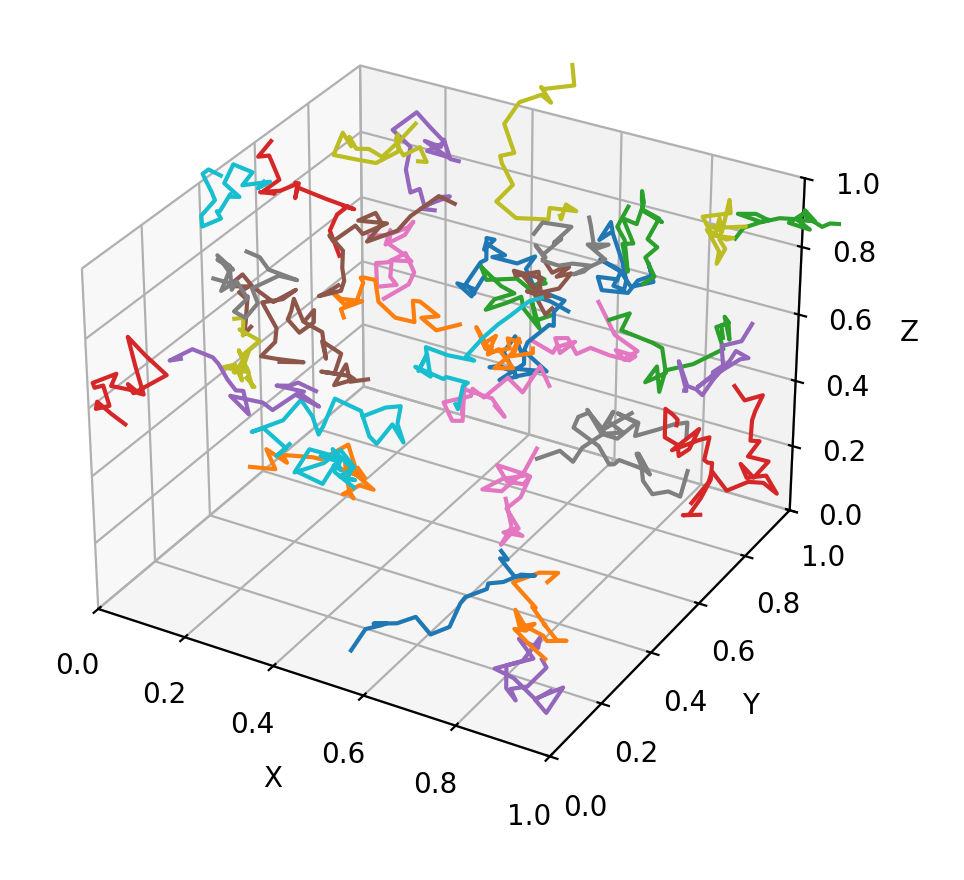
属性
| 名称 | 类型 | 默认值 | 说明 |
|---|---|---|---|
figure | Figure | metadata={'skip': True} | Matplotlib figure to draw - an instance of matplotlib.figure.Figure. |
controls | list[Control] | [] | A list of controls to display. |
alignment | MainAxisAlignment | MainAxisAlignment.START | How the child Controls should be placed vertically. |
horizontal_alignment | CrossAxisAlignment | CrossAxisAlignment.START | Defines how the controls should be placed horizontally. |
spacing | Number | 10 | Spacing between the controls. It is applied only when alignment is MainAxisAlignment.START, MainAxisAlignment.END or MainAxisAlignment.CENTER. |
tight | bool | False | Determines how vertical space is allocated. If False (default), children expand to fill the available vertical space. If True, only the minimum vertical space required by the children is used. |
wrap | bool | False | Whether the controls should wrap into additional columns (runs) when they don't fit in a single vertical column. |
run_spacing | Number | 10 | The spacing between runs when wrap is True. |
run_alignment | MainAxisAlignment | MainAxisAlignment.START | How the runs should be placed in the cross-axis when wrap is True. |
intrinsic_width | bool | False | If True, the Column will be as wide as the widest child control. |
width | Optional[Number] | None | Imposed Control width in virtual pixels. |
height | Optional[Number] | None | Imposed Control height in virtual pixels. |
left | Optional[Number] | None | The distance that the child's left edge is inset from the left of the stack. Note: Effective only if this control is a descendant of one of the following: Stack control, overlay list. |
top | Optional[Number] | None | The distance that the child's top edge is inset from the top of the stack. Note: Effective only if this control is a descendant of one of the following: Stack control, overlay list. |
right | Optional[Number] | None | The distance that the child's right edge is inset from the right of the stack. Note: Effective only if this control is a descendant of one of the following: Stack control, overlay list. |
bottom | Optional[Number] | None | The distance that the child's bottom edge is inset from the bottom of the stack. Note: Effective only if this control is a descendant of one of the following: Stack control, overlay list. |
align | Optional[Alignment] | None | Alignment of the control within its parent. |
margin | Optional[MarginValue] | None | Sets the margin of the control. |
rotate | Optional[RotateValue] | None | Transforms this control using a rotation around its center. The value of rotate property could be one of the following types: * number - a rotation in clockwise radians. Full circle 360° is math.pi * 2 radians, 90° is pi / 2, 45° is pi / 4, etc. * Rotate - allows to specify rotation angle as well as alignment - the location of rotation center. Example: python ft.Image( src="https://picsum.photos/100/100", width=100, height=100, border_radius=5, rotate=Rotate(angle=0.25 * pi, alignment=ft.Alignment.CENTER_LEFT) ) |
scale | Optional[ScaleValue] | None | Scales this control along the 2D plane. Default scale factor is 1.0, meaning no-scale. Setting this property to 0.5, for example, makes this control twice smaller, while 2.0 makes it twice larger. Different scale multipliers can be specified for x and y axis, by setting Control.scale property to an instance of Scale class. Either scale or scale_x and scale_y could be specified, but not all of them. Example: python ft.Image( src="https://picsum.photos/100/100", width=100, height=100, border_radius=5, scale=ft.Scale(scale_x=2, scale_y=0.5) ) |
offset | Optional[OffsetValue] | None | Applies a translation transformation before painting the control. The translation is expressed as an Offset scaled to the control's size. So, Offset(x=0.25, y=0), for example, will result in a horizontal translation of one quarter the width of this control. Example The following example displays container at 0, 0 top left corner of a stack as transform applies -1 * 100, -1 * 100 (offset * control's size) horizontal and vertical translations to the control: python import flet as ft def main(page: ft.Page): page.add( ft.Stack( width=1000, height=1000, controls=[ ft.Container( bgcolor=ft.Colors.RED, width=100, height=100, left=100, top=100, offset=ft.Offset(-1, -1), ) ], ) ) ft.run(main) |
flip | Optional[Flip] | None | Flips this control horizontally and/or vertically. Set to an instance of Flip to mirror across x-axis, y-axis, or both. |
transform | Optional[Transform] | None | Applies a generic matrix transform to this control. Set to an instance of Transform with a recorded Matrix4 to describe arbitrary transform sequences. |
aspect_ratio | Optional[Number] | None | The aspect ratio of the control. It is defined as the ratio of width to height. Note: In current implementation, if aspect_ratio is set, width and height on the same control are ignored for final rendered size. |
animate_opacity | Optional[AnimationValue] | None | 启用 opacity 属性的隐式动画。 详见 此处. |
animate_size | Optional[AnimationValue] | None | 启用此控件尺寸的隐式动画。 If width or height is set, changes to those dimensions are animated. If neither dimension is set, changes to the control's natural size are animated instead. 详见 此处. |
animate_position | Optional[AnimationValue] | None | 启用定位属性(left、right、top、bottom)的隐式动画。 详见 此处. |
animate_align | Optional[AnimationValue] | None | 启用 align 属性的隐式动画。 详见 此处. |
animate_margin | Optional[AnimationValue] | None | 启用 margin 属性的隐式动画。 详见 此处. |
animate_rotation | Optional[AnimationValue] | None | 启用 rotate 属性的隐式动画。 详见 此处. |
animate_scale | Optional[AnimationValue] | None | 启用 scale 属性的隐式动画。 详见 此处. |
animate_offset | Optional[AnimationValue] | None | 启用 offset 属性的隐式动画。 详见 此处. |
size_change_interval | int | 10 | Sampling interval in milliseconds for on_size_change event. Setting to 0 calls on_size_change immediately on every change. |
expand | Annotated[Optional[Union[bool, int]], V.instance_of((bool, int))] | None | 指定此控件是否/如何扩展以填充父布局中的可用空间。 详见 此处. Note: Has effect only if the direct parent of this control is one of the following controls, or their subclasses: Column, Row, View, Page. Raises: ValueError: If it is not of type bool or int. |
expand_loose | bool | False | 允许控件在主轴方向上有可用空间时扩展,但不要求填满所有可用空间。 详见 此处. Note: 若 expand_loose 为 True,则仅当同时满足以下条件时生效: - expand 不为 None,且 - the direct parent of this control is one of the following controls, or their subclasses: Column, Row, View, Page. |
col | ResponsiveNumber | 12 | 若此控件的父控件是 ResponsiveRow,此属性用于决定该控件横跨多少个虚拟列。 可以是数字,也可以是为不同断点配置不同值的字典,例如 col={"sm": 6}。 0 表示在该断点下隐藏控件,不占用任何列。 默认横跨 12 个虚拟列。 \ |
opacity | Annotated[Number, V.between(0.0, 1.0)] | 1.0 | 定义控件的透明度,取值范围 0.0(完全透明)到 1.0(完全不透明)。 抛出异常:ValueError:若不在 0.0 到 1.0 的闭区间内。 |
tooltip | Optional[TooltipValue] | None | 鼠标悬停时显示的 tooltip。 |
badge | Optional[BadgeValue] | None | 显示在控件顶部的徽标。 |
visible | bool | True | Every control has visible property which is True by default - control is rendered on the page. Setting visible to False 完全阻止该控件(及其所有子控件)渲染到页面画布上. 隐藏的控件不能通过键盘或鼠标聚焦或选中,也不会触发任何事件。 |
disabled | bool | False | Every control has disabled property which is False by default - control and all its children are enabled. Note: The value of this property will be propagated down to all children controls recursively. Example: For example, if you have a form with multiple entry controls you can disable them all together by disabling container: python ft.Column( disabled = True, controls=[ ft.TextField(), ft.TextField() ] ) |
rtl | bool | False | 控件的文字方向是否为从右到左(RTL)。 |
data | Any | skip_ | 任意类型的自定义数据。 |
key | Optional['KeyValue'] | None | 用于在更新之间保持控件身份稳定的 key。 |
scroll | Optional[Union[ScrollMode, Scrollbar]] | None | Defines the scroll bar configuration of this control. Can be a Scrollbar instance for full control over the appearance of the scrollbar, or a ScrollMode value, for ready-made scrollbar behaviors. |
auto_scroll | bool | False | Whether to automatically move the scroll position to the end when the content changes. This keeps the view pinned to the end as new children are added and as existing content grows in place (e.g. text streamed into an existing child). Pinning is suspended while the user has scrolled away from the end, and resumes once they scroll back. Note: Must be False for scroll_to method to work. |
auto_scroll_animation | Optional[AnimationValue] | None | Animation used when auto_scroll moves the view to the end. Accepts an Animation (duration + curve), an int duration in milliseconds, or True. Defaults to a 1 second ease animation; set a duration of 0 for an instant jump (recommended when following fast, token-by-token streaming so the view stays tightly pinned). |
scroll_interval | Number | 10 | Throttling in milliseconds for on_scroll event. |
adaptive | Optional[bool] | None | Enables platform-specific rendering or inheritance of adaptiveness from parent controls. |
只读属性
| 名称 | 类型 | 默认值 | 说明 |
|---|---|---|---|
parent | Optional['BaseControl'] | — | The direct ancestor(parent) of this control. It defaults to None and will only have a value when this control is mounted (added to the page tree). Page 控件(树的根)为例外 —— 它始终 parent=None。 |
page | 'Page' | — | 此控件所属的页面。 |
事件
| 名称 | 类型 | 默认值 | 说明 |
|---|---|---|---|
on_size_change | Optional[EventHandler[LayoutSizeChangeEvent['LayoutControl']]] | None | Called when the size of this control changes. size_change_interval defines how often this event is called. |
on_animation_end | Optional[ControlEventHandler['LayoutControl']] | None | 动画结束时调用,可用于串联多个动画。 事件参数 data 属性包含动画的名称。 详见 此处. |
on_scroll | Optional[EventHandler[OnScrollEvent]] | None | Called when scroll position is changed by a user. |
方法
| 名称 | 类型 | 默认值 | 说明 |
|---|---|---|---|
build | — | — | — |
on_message | — | — | Show status text produced by the underlying chart toolbar backend. Args: e: Message event emitted by MatplotlibChart. |
on_toolbar_update | — | — | Synchronize back/forward button enabled state with chart history. Args: e: Toolbar state update event from MatplotlibChart. |
pan_click | — | — | Toggle pan mode and ensure zoom mode is turned off. |
zoom_click | — | — | Toggle zoom mode and ensure pan mode is turned off. |
download_click | — | — | Export the figure in the selected format and prompt user to save it. |
init | — | — | — |
is_isolated | — | — | Return whether this control is marked as isolated. 被隔离的控件不会参与父级驱动的更新遍历,需要自行管理更新边界。 |
before_update | — | — | 每次控件即将更新时调用。 Note: 不要在此处调用 update()。 |
before_event | — | — | 在事件处理器执行前拦截事件。 返回 False 取消分发,返回 True 或 None 则继续正常的事件处理。 |
did_mount | — | — | 在控件挂载到页面树之后调用。 可重写以启动需要已挂载页面的资源,例如订阅、定时器或服务监听。 |
will_unmount | — | — | 在控件从页面树移除之前调用。 可重写以释放 did_mount() 中创建的资源,例如订阅、定时器或外部句柄。 |
get_data_channel | — | — | Resolve the [DataChannel] allocated on the Dart side for this widget. Pattern: on_data_channel_open: Optional[ft.EventHandler[DataChannelOpenEvent]] = None def init(self): self.on_data_channel_open = self._on_open def _on_open(self, e): self._channel = self.get_data_channel(e.channel_id) Idempotent — the underlying Connection caches DataChannels by id, so repeated calls return the same instance. No error path: the id always comes from a framework-fired event, so by the time this runs the channel exists on both sides. |
update | None | — | 请求更新该控件的 UI。 在修改控件状态或属性后调用。 控件必须已挂载到页面,并且未被冻结。 |
scroll_to | — | — | Moves the scroll position. Args: offset: Absolute scroll target in pixels. A negative value is interpreted relative to the end (e.g. -1 to jump to the very end). delta: Relative scroll change in pixels. Positive values scroll forward, negative values scroll backward. scroll_key: Key of the target control to scroll to. duration: The scroll animation duration. curve: The scroll animation curve. Notes: - Exactly one of offset, delta or scroll_key should be provided. - auto_scroll must be False. - This method is ineffective for controls (e.g. ListView, GridView) that build items dynamically. Examples: python await products.scroll_to(offset=100, duration=1000) await products.scroll_to(offset=-1, duration=1000) # to the end await products.scroll_to(delta=50) # forward 50px await products.scroll_to(scroll_key="item_20", duration=500) |
